- Multicamera Streaming With Up To 9 Devices
- Add Logos, Graphics, And Prerecorded Clips
- Stream To Multiple Platforms Simultaneously
- Invite Remote Guests With Easy Access
- Live-Edit Videos For Instant Polished Content

If you’ve been on the hunt for a way to supercharge your live streaming and video production without splurging on pricey gear or hiring a professional crew, you’re in luck. Switcher Studio might just be the game-changer you’ve been dreaming of. In this review, I’m going to walk you through all the cool features, pricing options, and how it stacks up against the competition. By the end, you’ll see why content creators, businesses, and organizations everywhere are jumping on the Switcher Studio bandwagon.
Ready to take your video content to the next level? Click here to check out Switcher Studio!
So, What Exactly Is Switcher Studio?
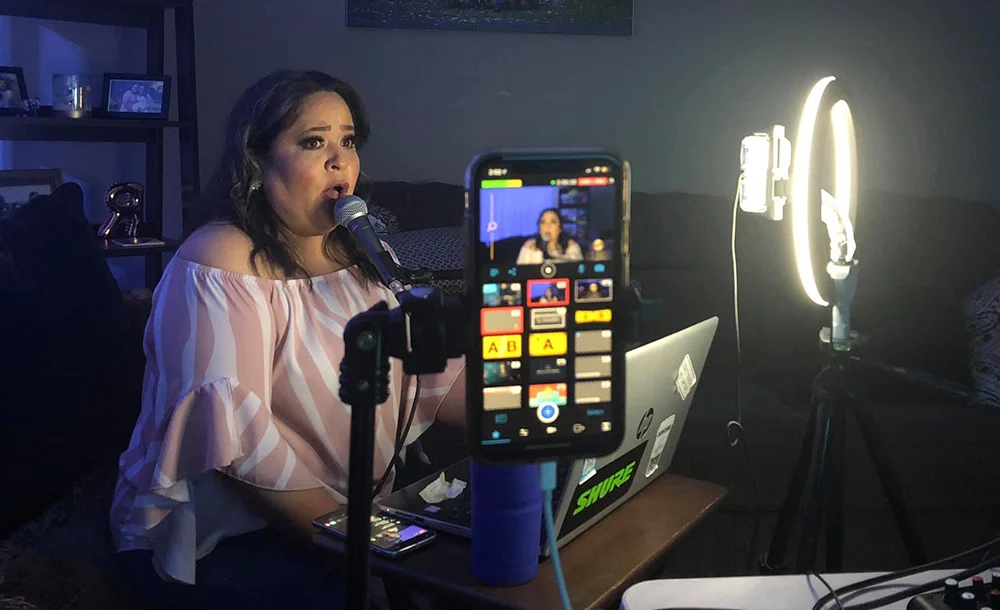
In a nutshell, Switcher Studio is an awesome iOS app that transforms your iPhones and iPads into a full-blown multi-camera studio. Yep, you read that right! It lets you create professional-quality live streams and recordings with real-time editing, graphics, and multimedia overlays. The best part? You can do all this using the devices you already have. Say goodbye to expensive equipment and complicated software setups.

Let’s Dive into the Features
Create Professional Videos Without the Hassle
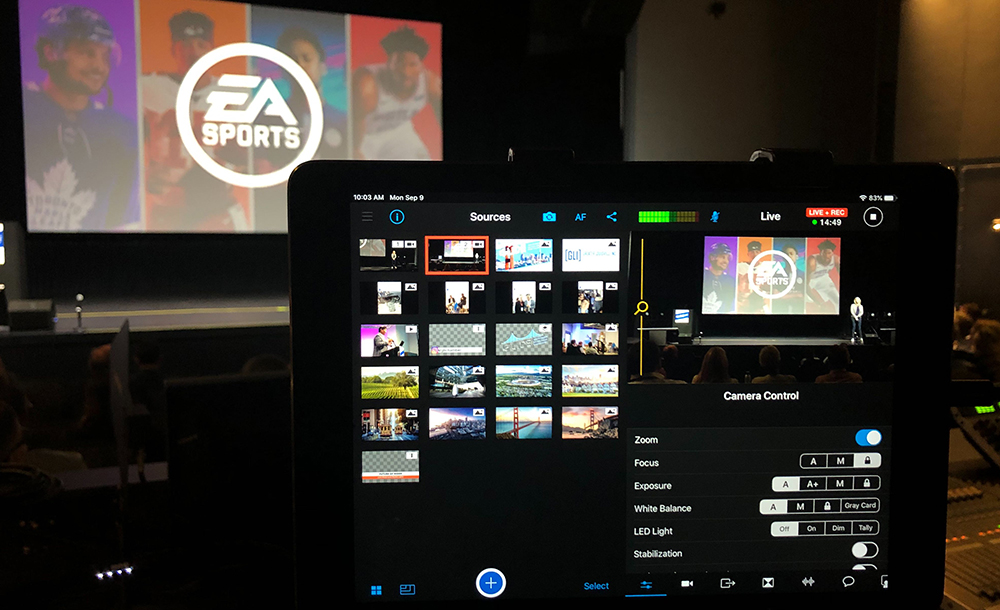
- Stream and Record on iOS: Control your entire video production right from your iPhone or iPad. Switch between camera angles, add graphics, screenshare—pretty much everything—with just a tap.
- Add Logos, Graphics, and Multimedia: Make your videos stand out by adding customizable graphics, text overlays, logos, and pre-recorded clips. Use premade templates or bring in your own assets to showcase your brand.
- Multi-Camera and Multi-Source Video: Want different angles? No problem! Connect up to nine iOS devices or other video sources at the same time. Switcher Studio supports iPhones, iPads, webcams, screenshares, and even professional cameras via HDMI.
- Use Professional Cameras: Thanks to the Accsoon SeeMo integration, you can easily bring in DSLR, mirrorless, or cinema cameras into your production. So if you have some fancy gear, you can put it to good use.
- Creator Tools: Streamline your workflow with features like Brand Profiles (to save your colors and logos), cloud storage for your assets and recordings, and an in-app Clips creator for those quick social media posts.

- Seamless Integrations: Stream directly to platforms like Facebook, YouTube, Twitch, and Microsoft Stream. Got another platform in mind? Custom RTMP destinations have you covered.
- Embeddable Video Players: Want to keep viewers on your own site? You can embed videos directly on your website, create content libraries with playlists, and even customize offline displays.
- Multistreaming: Reach more people by streaming to multiple platforms at once—no extra software needed.
- Switcher as a Webcam: Use your iPhone as a webcam in apps like Zoom, Microsoft Teams, and Google Meet. Perfect for those virtual meetings or webinars.
- Remote Guests: Bring in guests from anywhere in the world. They can share their screens and see the production in real-time. Great for interviews or collaborative projects.
- Interactive Video: Boost engagement with custom URLs, polls, and comment pinning. You can direct your audience to take action during the live stream.

Monetize Your Content
- Gated Content: Want to get paid for your videos? Set your own price and get paid directly by your viewers. Embed Switcher videos on your site and control access to your premium content.
- Video Subscriptions: Offer subscription plans to your audience. It’s a fantastic way to generate recurring revenue.
- Collect Donations: If you’re a nonprofit or just looking to raise funds, you can inspire viewers to donate during live streams with custom call-to-action graphics or interactive URLs.
- Interactive Live Shopping: If you’re into e-commerce and use Shopify, you can integrate your product collections directly into Switcher. Showcase products live and sell right on your website or Facebook Live.

Switcher Studio: Tailored Solutions Just for You
One of the best things about Switcher Studio is how it’s designed to meet the unique needs of various industries. They’ve got users from all walks of life, and they’re constantly improving the platform based on feedback from everyone. That means whether you’re in worship, sports, education, or any other field, Switcher Studio has something special just for you. Let’s dive into how it can make a difference in your world!
Worship
Livestream Your Services and Connect with Your Community
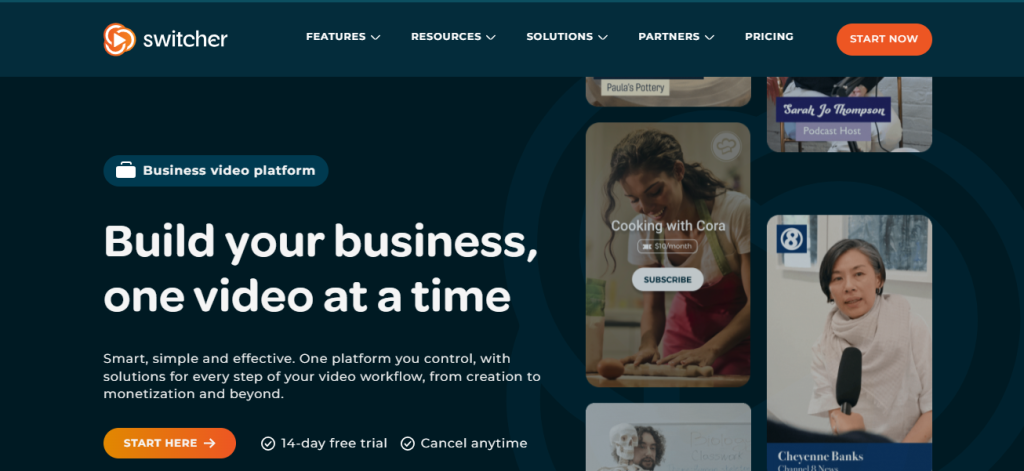
In today’s digital age, staying connected with your congregation is more important than ever. Switcher Studio makes it super easy to livestream your worship services, events, and messages. Reach your community wherever they are, without the need for complicated setups or expensive equipment. It’s all about bringing people together, even when they’re apart.
Podcasting
Bring Your Podcast to Life with Live Streaming
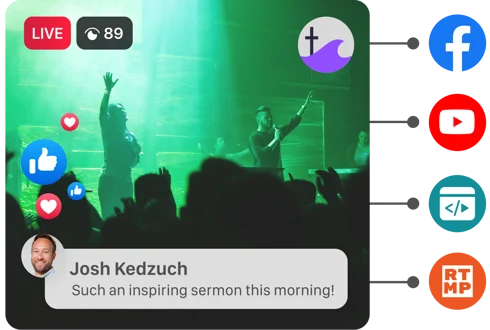
Podcasters, this one’s for you! Give your listeners more of what they love by livestreaming your episodes. Engage with your audience in real-time, take their questions, and add a visual element to your show. Switcher Studio helps you turn your podcast into an interactive experience that keeps listeners coming back for more.
Sports
Let Every Fan Catch the Action with Mobile Multicam Streaming
Whether it’s high school football, community soccer, or local basketball leagues, every game is filled with unforgettable moments. With Switcher Studio, you can capture all the action from multiple angles using just your phones and tablets. Now, every fan can watch the game live, no matter where they are.

Live Shopping
Transform Shopping with Personalized Virtual Experiences
If you’re in retail or e-commerce, Switcher Studio can revolutionize the way you connect with customers. Transport shoppers directly into your store or showroom with live virtual selling. Showcase products in real-time, answer questions on the spot, and create an immersive shopping experience that boosts sales and customer loyalty.
Fitness
Build Your Online Fitness Community with Live Workouts
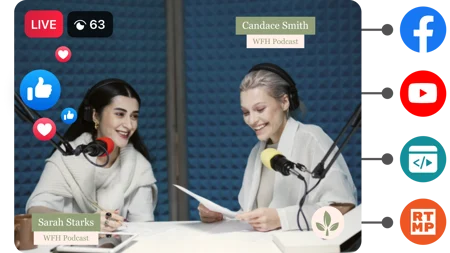
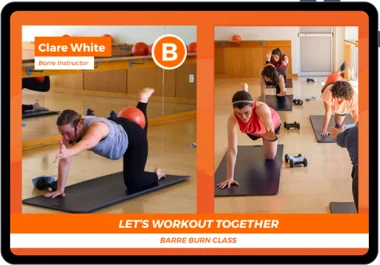
Fitness instructors and gyms, listen up! Switcher Studio lets you stream live workouts and classes straight to your clients. Create your own online fitness platform by embedding gated classes on your website. Keep your community motivated and engaged, whether they’re at home or on the go.
Gaming
Level Up Your Streams with Ease
Gamers, it’s time to take your streams to the next level. Use Switcher Cast and the Switcher Studio iOS app to broadcast your gameplay seamlessly. Share your screen, add commentary, interact with your audience—all without the usual tech headaches. It’s a game-changer for your streaming experience.
Creators
Share Your Passion Without Breaking the Bank
Content creators and influencers, we know you want to produce amazing videos without spending a fortune on gear. Switcher Studio empowers you to share your passions and engage your audience using the devices you already have. Whether you’re vlogging, teaching, or entertaining, you can create professional content with ease.
Music
Perform Live and Connect with Fans Online
Musicians and bands can bring their performances straight to fans worldwide. With Switcher Studio, you can stream live shows, collaborate with other artists remotely, and even accept tips—all through live video. It’s a fantastic way to keep the music alive and connect with your audience in real-time.
Education
Enhance Learning with Live Streaming
Teachers and educators, Switcher Studio can transform your virtual classroom. Stream live lessons, engage with students through real-time Q&A, and even teach students how to create their own streams. It’s an innovative way to make learning interactive and accessible from anywhere.
Radio
Expand Your Reach with Visual Content
Radio stations and hosts can now repurpose and enhance their on-air content by adding a visual element. Whether you’re in the studio or out in the field, Switcher Studio lets you stream to your audience, giving them a new way to connect with your shows and segments.
Nonprofit
Raise Awareness and Funds Through Streaming
Nonprofits can harness the power of live video to share their mission, host virtual events, and inspire donations. Switcher Studio offers simple streaming solutions that make it easy to connect with supporters, tell your story, and make a bigger impact—all without needing a big budget.
Real Estate
Host Virtual Tours and Open Houses
Real estate professionals can showcase properties like never before. With Switcher Studio, you can host virtual open houses, provide live walk-throughs, and even incorporate live drone footage. Give potential buyers an immersive experience that sets you apart in the market.
Media
Cover Stories from Every Angle
Journalists and media outlets can take advantage of easy multicam streaming to cover news and events. Capture different perspectives, conduct live interviews, and bring stories to life with professional-quality video—all while streaming directly to your audience.
Arts & Crafts
Share Your Creativity with the World
Artists and crafters, it’s time to shine! Stream online workshops, DIY craft shows, or virtual gallery tours. Switcher Studio helps you connect with fellow creatives and enthusiasts, sharing your skills and passion without the need for expensive equipment.
E-Learning
Monetize Your Knowledge with Online Courses
Educators and experts can host live and recorded e-learning videos, engage with students, and monetize courses using gated content. Switcher Studio makes it simple to share your knowledge and earn revenue, all while providing valuable learning experiences.
Switcher Studio is all about making video production accessible and tailored to your needs. By listening to feedback from users in every industry, they’re continually enhancing the platform to serve you better. No matter your field, Switcher Studio has the tools to help you connect, create, and grow.
Ready to see how Switcher Studio can make a difference for you? Click here to learn more and start your free trial today!
Switcher Studio: Livestreaming Possibilities for Any Platform
One of the coolest things about Switcher Studio is how flexible it is when it comes to streaming platforms. No matter where your audience hangs out, Switcher Studio lets you meet them there. With built-in integrations, you can stream stunning live video directly to Facebook, YouTube, Twitch, Microsoft Stream, and more. Let’s dive into how Switcher Studio makes it easy to share your content across various platforms!
Multistreaming
Reach Way More Viewers Without Extra Effort
Why limit yourself to just one platform when you can broadcast to multiple? Switcher Studio’s Multistreaming feature allows you to stream to several platforms at once, without any additional software or complicated steps. It’s as simple as setting up your destinations and hitting “Go Live.” This means you can maximize your reach and engage with audiences wherever they are.
Switcher Player
Own Your Content with Ease
Want to keep viewers on your own website? The Switcher Player lets you embed your live streams and recorded videos directly on your site. It’s an excellent way to own your content and create a centralized hub for your audience. Plus, you can customize the player to match your brand, making it a seamless part of your online presence.
Engage Your Community Like Never Before
Facebook is a fantastic platform for building and engaging with your community. With Switcher Studio, you can do more than just stream—you can display viewer comments, conduct live polls, and interact with your audience in real-time. It’s a powerful way to boost engagement and make your live streams more interactive and fun.
YouTube
Entertain and Inform with Live Content
Whether you’re hosting reviews, tutorials, shows, or any other type of content, YouTube is a go-to platform for creators. Switcher Studio makes it easy to livestream to your YouTube channel, helping you entertain your viewers with high-quality, professional-looking videos. Plus, you can leverage YouTube’s massive audience to grow your own following.
Video Conferencing
Go Beyond Standard Video Calls
Tired of the limitations of standard video conferencing platforms? With Switcher Studio, you can enhance your virtual meetings, webinars, and conferences. Use multiple camera angles, add graphics and overlays, and create a more engaging experience for your participants. It’s perfect for businesses, educators, and anyone looking to make their online meetings more dynamic.
Twitch
Level Up Your Streaming Game
If you’re a gamer, podcaster, or just love live chatting with an audience, Twitch is where it’s at. Switcher Studio allows you to livestream your gaming sessions, chats, podcasts, and more, all using your iPhone or iPad. With professional features like multi-camera setups and real-time editing, you can stand out in the crowded Twitch community.
Microsoft Stream
Connect with Your Organization
For businesses and organizations using Microsoft Stream, Switcher Studio provides a seamless way to livestream meetings, conferences, and events. Engage with your team or entire company by delivering high-quality live video that goes beyond basic presentations. It’s a great tool for internal communications, training sessions, and more.
In Summary
No matter where your audience is, Switcher Studio helps you reach them with ease. Its versatile platform integrations and user-friendly features make livestreaming accessible and enjoyable. So why not take your content to the next level and connect with viewers on the platforms they love?
Ready to explore the possibilities? Click here to learn more about Switcher Studio and start your free trial today!
One Plan for Video — Everything Your Brand Needs to Grow
Limited-Time Offers on the Business Plan
Switcher Studio is rolling out some fantastic limited-time deals on their Business Plan:
Monthly Plan
- Special Offer: $79/month (Regularly $99/month)
- $20 off your first month, then renews at $99/month
- Perfect if you want to experience all the features without a long-term commitment.
Annual Plan
- Special Offer: $71/month when billed annually (Total of $848/year)
- $95 off your first year, then renews at $948/year
- Best value for long-term users, saving you more over the course of the year.
Plus, you still get a free 14-day trial to test out all the features before committing. Don’t miss out on these limited-time offers to unlock everything your brand needs to grow!
Now’s a great time to jump in and take advantage of these deals. Click here to start your free trial and elevate your video content today!
Switcher Studio vs. Competitors
Let’s break down how Switcher Studio stacks up against some of its main competitors in the live streaming and video production space.
| Feature | Switcher Studio | OBS Studio | StreamYard | Ecamm Live | vMix |
|---|---|---|---|---|---|
| Platform Compatibility | iOS (iPhone/iPad) | Windows, Mac | Web-based | Mac only | Windows only |
| Multi-Camera Support | Yes (up to 9 iOS devices) | Yes | Limited | No | Yes |
| Ease of Use | High | Moderate | High | High | Moderate |
| Real-Time Editing | Yes | Yes | No | Limited | Yes |
| Guest Involvement | Yes (up to 5 guests) | Complicated | Yes | No | Yes |
| Mobile Streaming | Yes (iOS devices) | Limited | Limited | No | No |
| Professional Camera Support | Yes (via HDMI integration) | Yes | Limited | Yes | Yes |
| Monetization Tools | Yes | No | No | No | No |
| Cloud Storage | Yes | No | No | No | No |
| Custom Graphics & Overlays | Yes | Yes | Yes | Yes | Yes |
| Multistreaming | Yes | With plugins | Yes | Yes | Yes |
| Support & Updates | Regular updates, responsive support | Community support | Email support | Email support | Regular updates, email support |
FAQs about Switcher Studio
Switcher Studio is an iOS application that transforms your iPhones and iPads into a multi-camera video production studio. It allows you to create professional-quality live streams and recorded videos with real-time editing, graphics, overlays, and more. You can switch between multiple camera angles, add multimedia elements, and stream directly to platforms like Facebook, YouTube, Twitch, and others—all using the devices you already own.
Switcher Studio works by connecting your iOS devices over a shared Wi-Fi network, enabling them to function as cameras and control units in your video production. Here’s how you can get started:
Install the App: Download the Switcher Studio app on your main iPhone or iPad (the “Switcher”) and any additional iOS devices you want to use as cameras.
Connect Devices: Ensure all devices are on the same Wi-Fi network. Open the app on each device and connect them within the Switcher Studio interface.
Customize Your Stream: Use the app to add logos, graphics, text overlays, and multimedia elements. You can also set up your streaming destinations directly within the app.
Go Live or Record: Start your live stream or record your video. You can switch between camera angles, add effects, and manage your production in real-time.
Engage Your Audience: Utilize features like live chat, polls, and interactive elements to engage with your viewers during the stream.
Switcher Studio is headquartered in Louisville, Kentucky, USA. The company is dedicated to developing innovative video production solutions that make it easy for anyone to create professional-quality content without the need for expensive equipment or extensive technical expertise.
You can reach out to Switcher Studio through several channels:
Website Contact Form: Visit their official website at www.switcherstudio.com and navigate to the “Contact Us” or “Support” page to send a message.
Email Support: Send an email to their support team at support@switcherstudio.com for assistance with technical issues or inquiries.
Social Media: Connect with them on social media platforms like Facebook, Twitter, or Instagram for updates and support.
Help Center: Access tutorials, FAQs, and guides in their Help Center on the website.
Yes, Switcher Studio is currently designed exclusively for iOS devices like iPhones and iPads. This focus allows for seamless integration and optimization within the Apple ecosystem, providing a smooth and reliable user experience.
Absolutely! Switcher Studio offers a 14-day free trial that gives you access to all features. It’s a great opportunity to test the platform and see if it fits your needs before committing to a subscription.
No, one of the key benefits of Switcher Studio is that it utilizes the devices you already own. With just your iPhones or iPads, you can create professional-quality videos. If you wish to enhance your production, you can integrate professional cameras via HDMI using compatible hardware like the Accsoon SeeMo, but it’s not a requirement.
Yes, with Switcher Studio’s Video Chat feature, you can invite up to five remote guests to join your live stream. Guests can participate using nearly any device with a camera and internet connection. They can also share their screens and interact with you in real-time.
Yes, Switcher Studio allows you to multistream to multiple platforms simultaneously. You can stream to Facebook, YouTube, Twitch, LinkedIn, and custom RTMP destinations all at once, maximizing your reach and engagement without needing additional software.
Switcher Studio offers several monetization tools:
Gated Content: You can set up paywalls for your videos and live streams, allowing you to charge viewers for access directly through your website.
Video Subscriptions: Offer subscription plans to your audience, providing them with exclusive content and generating recurring revenue.
Interactive Live Shopping: If you’re a Shopify merchant, you can integrate your product collections into Switcher and sell products during live streams.
Collect Donations: Use call-to-action graphics and interactive links to encourage viewers to donate during your live streams, ideal for nonprofits and content creators.
Switcher Studio has built-in integrations with popular platforms like Facebook Live, YouTube, Twitch, and Microsoft Stream. Additionally, you can stream to virtually any platform that supports RTMP (Real-Time Messaging Protocol) streaming by entering the stream URL and key.
Yes, Switcher Studio provides prompt and personalized customer support. You can access their Help Center for tutorials and guides, reach out via email, or contact them through social media channels for assistance.
Absolutely! Switcher Studio offers a variety of resources, including tutorials, webinars, and a comprehensive Help Center to help you get the most out of the platform. Whether you’re a beginner or an experienced user, you’ll find valuable information to enhance your video production skills.

Why Choose Switcher Studio?
If you’re considering ways to elevate your live streaming and video production, here’s why Switcher Studio stands out as the go-to solution:
User-Friendly and Accessible
No Technical Expertise Required
- Ease of Use: Switcher Studio is designed for everyone—from beginners to seasoned professionals. Its intuitive interface means you can start creating amazing content right away.
- Use What You Have: All you need is an iPhone or iPad. No need to invest in expensive cameras or complex equipment.
Multi-Camera Magic
Capture Every Angle
- Up to 9 Cameras: Connect multiple iOS devices to get different angles and perspectives in your live streams.
- Seamless Switching: Easily switch between cameras with a tap, giving your audience a dynamic viewing experience.
Real-Time Editing and Customization
Make It Uniquely Yours
- Add Graphics and Overlays: Incorporate logos, text, and custom graphics on the fly.
- Professional Touches: Use transitions, pre-recorded clips, and multimedia elements to enhance your production.
Versatile Platform Integration
Reach Your Audience Anywhere
- Built-In Integrations: Stream directly to Facebook, YouTube, Twitch, Microsoft Stream, and more.
- Multistreaming: Broadcast to multiple platforms simultaneously without extra software.
Monetization Tools
Turn Your Passion into Profit
- Gated Content: Charge for access to premium videos or live streams.
- Video Subscriptions: Offer subscription plans for recurring revenue.
- Live Shopping Integration: Sell products during live streams with Shopify integration.
- Collect Donations: Encourage viewer support during your streams.
Remote Guest Feature
Collaborate from Anywhere
- Invite Guests: Bring up to five remote guests into your live stream.
- Interactive Sessions: Perfect for interviews, panels, and collaborative events.
Cost-Effective Solution
High Quality Without High Costs
- Budget-Friendly: Use devices you already own to create professional content.
- No Hidden Fees: One simplified plan includes all features you need.
Switcher Studio—Transforming Your Video Content with Ease
In today’s fast-paced digital world, captivating video content is essential for engaging audiences and standing out from the competition. Switcher Studio emerges as a powerful ally in this endeavor, offering a user-friendly platform that democratizes professional video production. By harnessing the capabilities of your iPhones and iPads, it eliminates the need for expensive equipment and complex setups, allowing anyone—from content creators and educators to businesses and nonprofits—to produce high-quality live streams and recordings.
By consistently incorporating user feedback, Switcher Studio ensures that its platform evolves to meet the changing demands of its users. The result is a seamless blend of simplicity and sophistication that empowers you to connect with your audience more effectively.
Now is the perfect time to elevate your video content. With a free 14-day trial and limited-time offers providing discounts on your first month or year, you can experience firsthand how Switcher Studio can revolutionize your approach to video production.
Take the leap and unlock new creative possibilities. Click here to start your free trial of Switcher Studio today, and transform the way you create and share your story.