In today’s fast-paced business environment, leveraging professional networks is crucial for growth. LinkedIn has emerged as the go-to platform for B2B marketers, sales professionals, and entrepreneurs looking to connect with potential clients and partners. However, manually managing connections, messages, and outreach campaigns can be time-consuming and inefficient. Enter Closely—a powerful LinkedIn automation and lead generation tool designed to streamline your networking efforts and supercharge your sales pipeline. But does it live up to the hype? Let’s dive deep into this comprehensive review of Closely.
What is Closely?
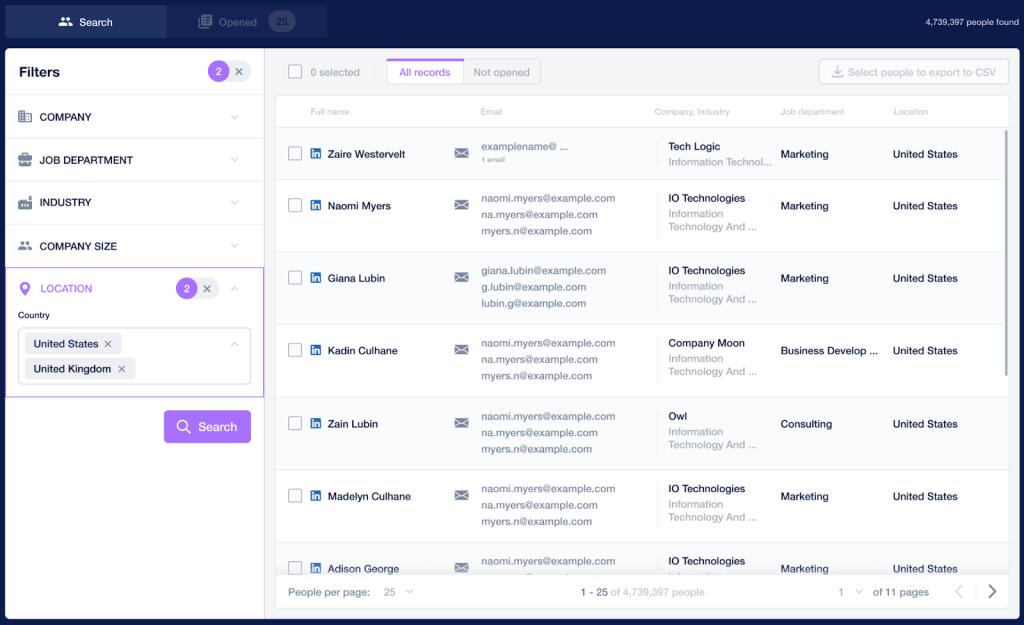
Closely is a lead intelligence and routine automation platform designed to streamline the repetitive tasks of your sales team. By taking over routine activities such as outreach automation, Closely reduces the workload on sales representatives, allowing them to focus more on essential tasks like closing deals and reselling. The platform automates connection requests and follow-ups, running them on autopilot, and enables you to upload contacts from groups, events, and posts to reach high-quality leads. With robust analytics, Closely provides insights into which campaigns are succeeding and which ones may need attention, helping you optimize your strategies. Additionally, it offers network management by gathering all prospects in your network into specific groups according to your criteria, enhancing organization and targeting. Step-by-step onboarding videos guide you through the process, ensuring a smooth and worry-free experience.

Closely Products
Closely offers a suite of tools designed to optimize LinkedIn outreach, lead generation, and customer engagement. Here’s a detailed discussion of their key products:
1. LinkedIn Email Extractor
The LinkedIn Email Extractor is a specialized tool by Closely that enables users to find and collect email addresses associated with LinkedIn profiles. This tool enhances direct communication with leads outside of the LinkedIn platform.
Key Features:
- Accurate Email Retrieval:
- Verified Emails: Retrieves verified email addresses to ensure high deliverability rates.
- Advanced Search Filters: Utilize LinkedIn’s search capabilities to target specific industries, job titles, locations, and more.
- Bulk Operations:
- Mass Email Extraction: Collect emails from multiple profiles simultaneously to save time.
- List Building: Compile extensive lists of potential leads for email marketing campaigns.
- Compliance and Safety:
- GDPR Compliance: Ensures that data collection adheres to privacy regulations.
- Secure Data Handling: Protects user data and the privacy of extracted contact information.
2. LinkedIn Scraper Closely Chrome Extension
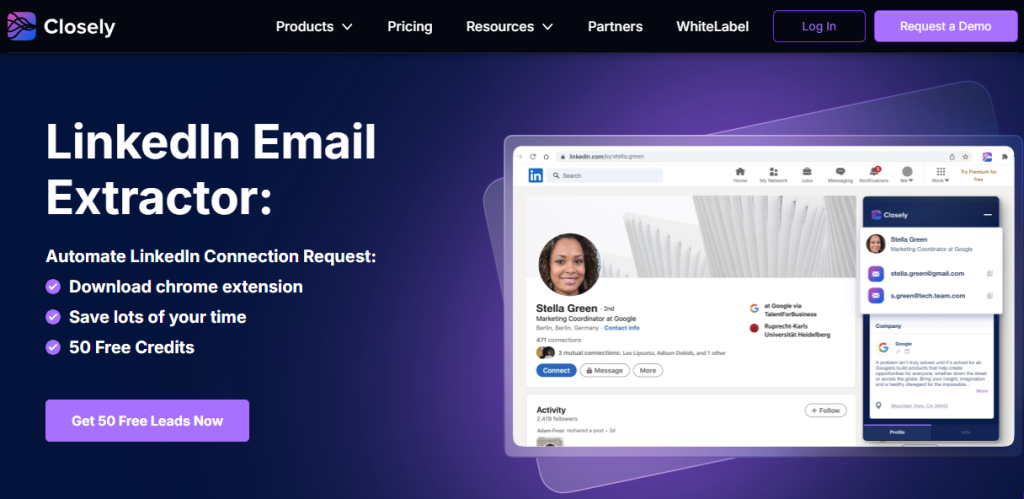
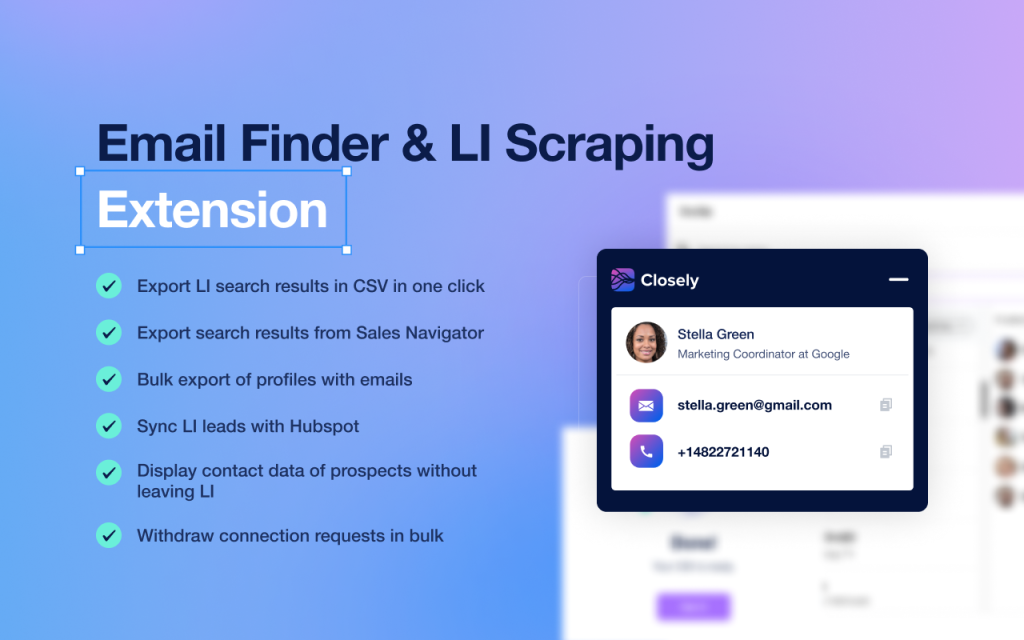
The Closely Chrome Extension is a powerful tool that allows users to extract emails and other contact information directly from LinkedIn profiles. It streamlines the process of finding and exporting lead data, making it easier to build targeted outreach lists.
Key Features:
- LinkedIn Email Finder:
- Single and Bulk Email Extraction: Find emails for individual leads or extract emails in bulk from multiple LinkedIn profiles.
- Data Export: Export collected contact information to CSV files for easy integration with CRM systems or email marketing tools.
- Profile Scanning: Quickly scan LinkedIn profiles to gather essential lead information, including names, job titles, company names, and email addresses.
- Easy Integration:
- Seamless LinkedIn Integration: Operates directly within LinkedIn, allowing users to access features without leaving the platform.
- User-Friendly Interface: Simple and intuitive design makes it easy to navigate and utilize the extension’s features.
3. Multichannel Campaigns
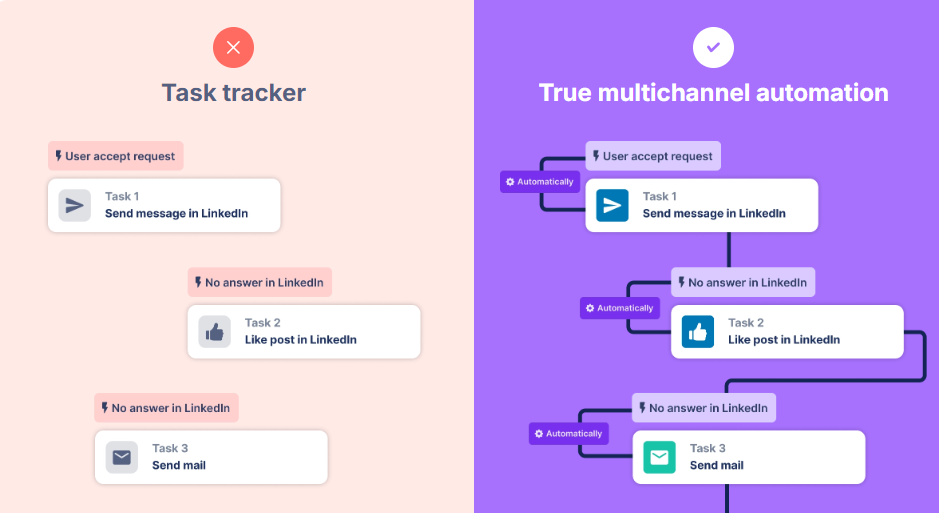
Closely Multichannel Campaigns feature allows users to engage potential partners and clients across various business channels. By integrating LinkedIn outreach with email campaigns, users can maximize their engagement strategies.
Key Features:
- Integrated Outreach:
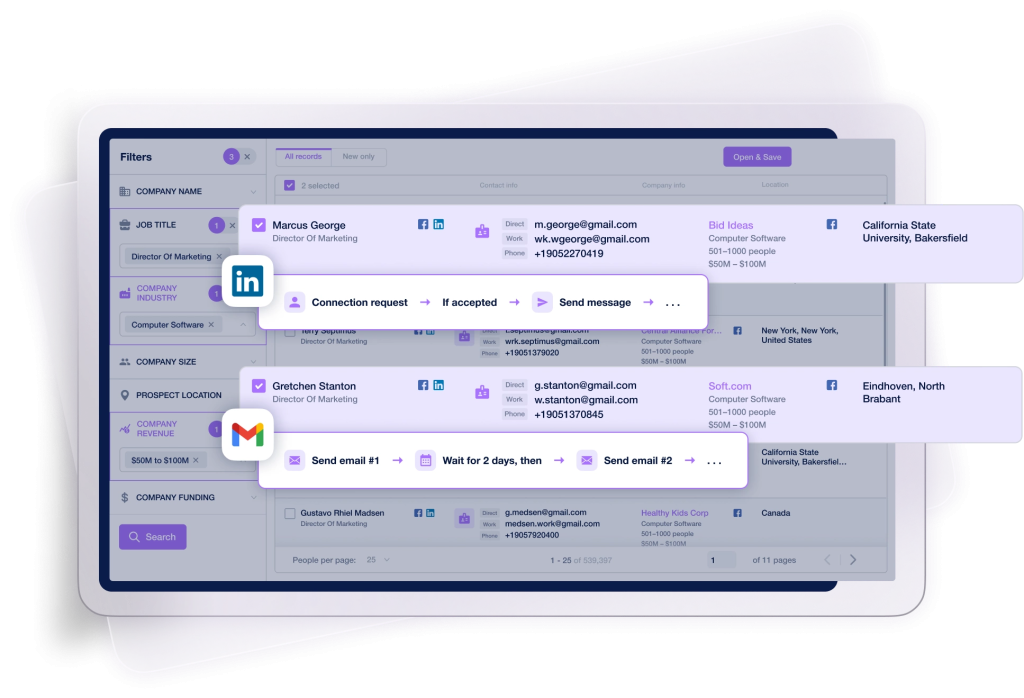
- LinkedIn and Email Synergy: Combine LinkedIn messages with email outreach for a cohesive communication strategy.
- Automated Sequences: Set up automated sequences that include connection requests, follow-up messages, and emails.
- Personalization:
- Customized Messaging: Personalize messages using placeholders for names, company details, and other variables to enhance engagement.
- Segmentation: Target specific audience segments with tailored content based on industry, role, or other criteria.
- Analytics and Tracking:
- Performance Metrics: Monitor open rates, reply rates, and overall campaign effectiveness across channels.
- A/B Testing: Test different messaging approaches to optimize engagement.
4. LinkedIn Outreach Automation
Closely provides tools to automate LinkedIn outreach activities, helping users efficiently connect with potential leads and nurture relationships.
Key Features:
- Automated Connection Requests:
- Personalized Invitations: Send customized connection requests on autopilot.
- Scheduled Sending: Control the timing and pacing of requests to mimic natural behavior.
- Message Automation:
- Follow-Up Sequences: Set up automated follow-up messages to stay engaged with new connections.
- Engagement Actions: Automatically like posts, view profiles, and endorse skills to increase visibility and build rapport.
- Smart Reply Detection:
- Response-Based Actions: The system detects when a prospect replies and can adjust messaging sequences accordingly to avoid sending irrelevant follow-ups.
5. Email Outreach
Closely Email Outreach feature enables users to engage a broader audience through professional email communication, complementing LinkedIn outreach efforts.
Key Features:
- Professional Email Campaigns:
- Template Library: Access pre-designed email templates optimized for engagement.
- Customization: Personalize emails with dynamic fields to address recipients by name and include relevant details.
- Bulk Email Sending:
- Scalable Outreach: Send emails to large lists of contacts efficiently.
- Scheduling: Schedule emails to be sent at optimal times for recipient engagement.
- Tracking and Analytics:
- Engagement Metrics: Monitor email opens, clicks, and replies.
- Email Deliverability: Tools to improve deliverability rates and avoid spam filters.
6. Meetings Scheduling with Appoint by Closely
Appoint by Closely is a feature that simplifies the process of scheduling appointments and meetings with prospects directly through the platform.
Key Features:
- Integrated Calendar:
- Calendar Synchronization: Syncs with your existing calendar (e.g., Google Calendar, Outlook) to reflect availability.
- Time Zone Detection: Automatically adjusts for different time zones to prevent scheduling conflicts.
- Easy Booking:
- Shareable Links: Provide prospects with a link to schedule a meeting at a time that suits both parties.
- Customizable Meeting Types: Set different meeting durations and types (e.g., introductory call, demo, consultation).
- Automated Reminders:
- Email Notifications: Sends automatic reminders to both parties to reduce no-shows.
- Confirmation Messages: Provides immediate confirmation after a meeting is scheduled.
Pros and Cons
Pros:
- Time Efficiency: Automates repetitive tasks, freeing up time for strategic activities.
- Advanced Personalization: Customizable templates and placeholders make messages feel personal.
- Safety Features: Cloud-based operation reduces risk compared to browser extensions.
- Analytics: Detailed insights help optimize campaigns for better results.
- Team Collaboration: Supports multiple users and accounts, ideal for sales teams.
Cons:
- Learning Curve: New users may need time to familiarize themselves with all features.
- Cost: Pricing might be a barrier for startups or small businesses with limited budgets.
- Dependence on LinkedIn Policies: Changes in LinkedIn’s terms of service could impact functionality.
Who Should Use Closely?
- Sales Professionals: Streamline outreach efforts and manage large volumes of prospects.
- Recruiters: Automate candidate sourcing and engagement.
- Marketing Teams: Enhance lead generation campaigns and track performance.
- Entrepreneurs: Expand professional networks efficiently without dedicating excessive time.
- Agencies: Manage multiple client accounts and campaigns from a centralized platform.
- Newly startups: leverage Closely to build their professional networks and generate high-quality leads efficiently.
- Growth marketers: Benefit from scalable outreach automation and analytics to optimize their marketing campaigns.
Comparison with Competitors
| Feature | Closely | LinkedIn Sales Navigator | Dux-Soup |
|---|---|---|---|
| LinkedIn Automation | Yes | Limited | Yes |
| Cloud-Based | Yes | N/A | No (Browser Extension) |
| Advanced Personalization | Yes | Limited | Yes |
| Team Collaboration | Yes | Yes | No |
| Safety Features | High | High | Moderate |
| CRM Integration | Yes | Yes | Limited |
| Pricing | Moderate | Expensive | Affordable |
Tips for Maximizing Results with Closely
- Personalize Your Messages: Use placeholders and custom fields to make your outreach feel genuine.
- Segment Your Audience: Tailor your messaging based on different audience segments for higher engagement.
- Monitor Performance Metrics: Regularly check analytics to identify what’s working and adjust accordingly.
- Stay Within Safe Limits: Adhere to recommended usage limits to minimize the risk of account restrictions.
- Test and Optimize: Utilize A/B testing to refine your messaging and strategies.
Straightforward Pricing for Every Need
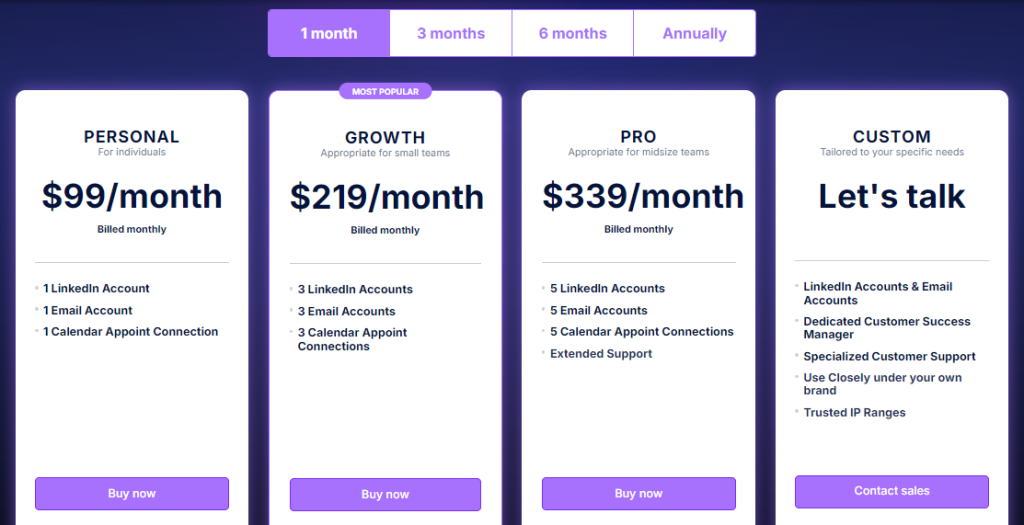
Closely offers simple and transparent pricing plans designed to accelerate your business growth. Choose the plan that fits you best and enjoy a complete suite of essential features:
Boost your outreach and exceed your targets with a plan that’s right for you. Visit Closely Pricing to get started.
How Does Closely Work?
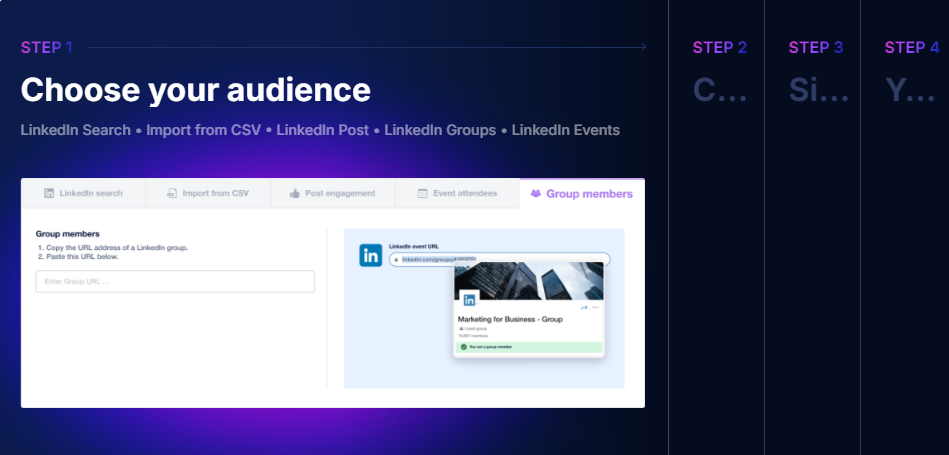
Step 1: Define Your Target Audience
Utilize LinkedIn’s search filters or import a list of contacts to create your target audience. You can filter prospects based on factors like industry, company size, location, and more.
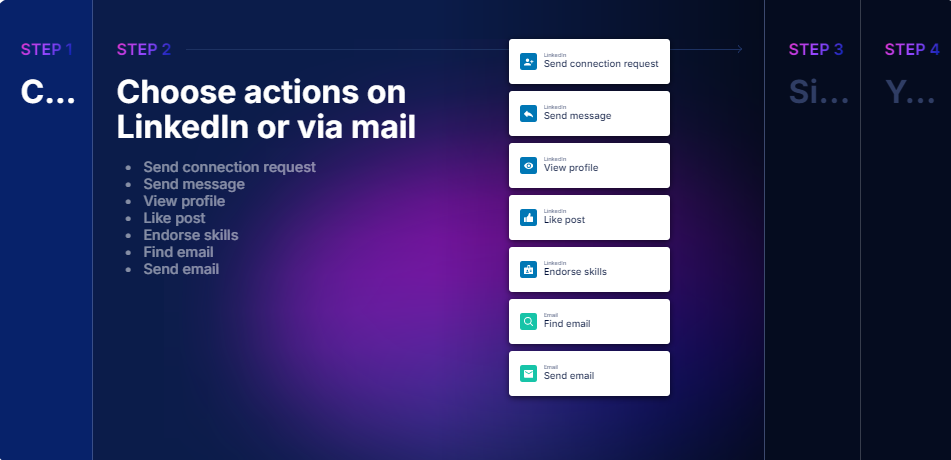
Step 2: Craft Personalized Messages
Create personalized connection requests and follow-up messages using placeholders for first names, company names, and other variables to make your outreach feel authentic.
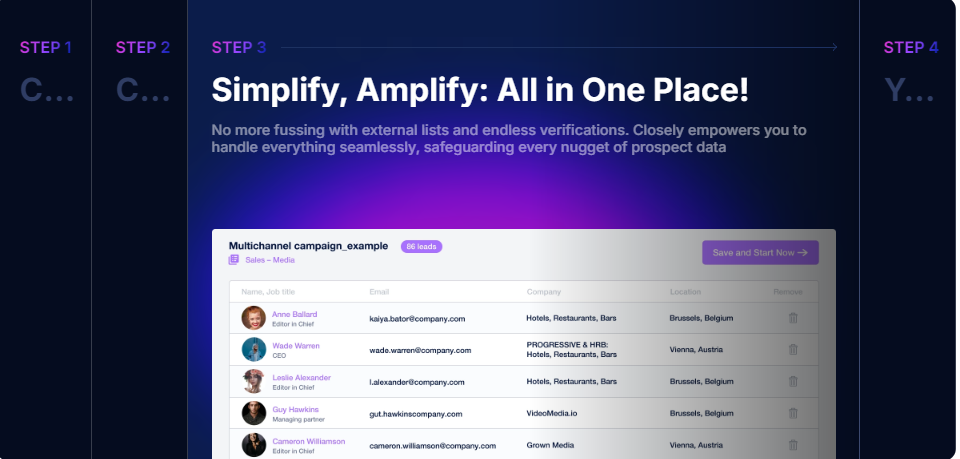
Step 3: Set Up Automated Campaigns
Configure your messaging sequences, schedule send times, and set limits to ensure compliance with LinkedIn’s usage policies.
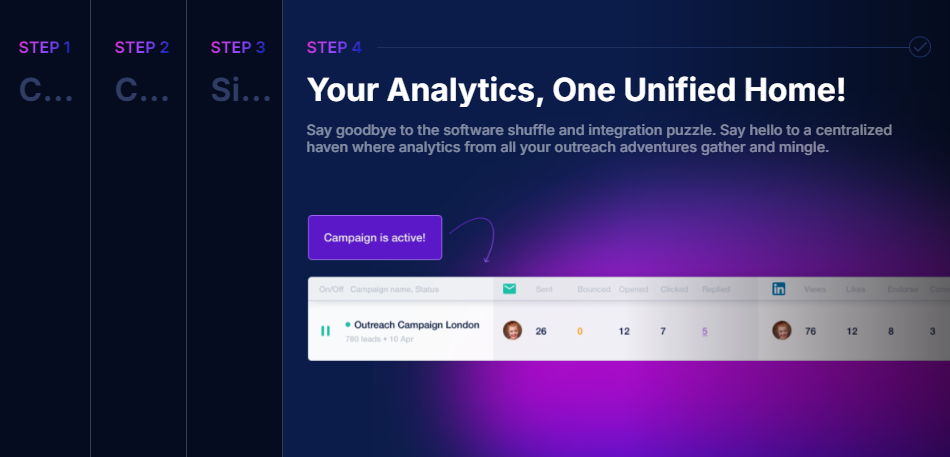
Step 4: Launch and Monitor
Start your campaign and monitor its performance through the dashboard. Make adjustments as needed based on real-time analytics.
How Does Closely Empower Your Success?
Closely is designed to address several common challenges that professionals face in lead generation and LinkedIn outreach. Here’s how Closely helps you overcome these obstacles:
1. Time-Consuming Manual Outreach
- Challenge: Manually sending connection requests, follow-up messages, and engaging with prospects on LinkedIn is tedious and consumes valuable time.
- Closely Solution: Automates these repetitive tasks with personalized messaging sequences, allowing you to reach more prospects efficiently without sacrificing the personal touch.
2. Difficulty in Finding Accurate Contact Information
- Challenge: Finding verified email addresses for leads can be difficult, often resulting in outdated or incorrect data.
- Closely Solution: The LinkedIn Email Finder and Extractor tools provide accurate, up-to-date contact information directly from LinkedIn profiles, ensuring your outreach reaches the right people.
3. Limited Engagement Across Multiple Channels
- Challenge: Relying solely on LinkedIn for outreach limits your ability to connect with prospects who may be more responsive via email or other platforms.
- Closely Solution: Enables multichannel campaigns that combine LinkedIn messages and professional email outreach, maximizing your chances of engagement by reaching prospects where they’re most active.
4. Scheduling Challenges and Meeting Coordination
- Challenge: Coordinating meeting times with prospects often involves back-and-forth communication, leading to delays and missed opportunities.
- Closely Solution: Appoint by Closely streamlines the scheduling process by allowing prospects to book meetings directly based on your availability, reducing friction and accelerating the sales process.
5. Lack of Personalization in Automated Outreach
- Challenge: Generic automated messages can feel impersonal and lead to low response rates.
- Closely Solution: Offers dynamic placeholders and customizable templates, enabling you to personalize automated messages for each prospect, which enhances engagement and builds rapport.
6. Risk of LinkedIn Account Restrictions
- Challenge: Using automation tools can put your LinkedIn account at risk if they don’t comply with usage policies.
- Closely Solution: Operates within LinkedIn’s guidelines by mimicking human-like behavior and allowing users to set safe daily limits, reducing the risk of account restrictions or bans.
7. Inefficiency of Managing Multiple Tools
- Challenge: Juggling various tools for email extraction, outreach automation, and scheduling is inefficient and can lead to data silos.
- Closely Solution: Consolidates these functionalities into a single platform, streamlining your workflow, saving time, and ensuring all your data is in one place for better management.
8. Lack of Insightful Analytics
- Challenge: Without proper analytics, it’s difficult to measure the effectiveness of your outreach campaigns and make data-driven decisions.
- Closely Solution: Provides detailed analytics and reporting features that track key metrics like connection acceptance rates, reply rates, and campaign performance, helping you optimize your strategies.
9. Compliance and Data Security Concerns
- Challenge: Concerns about GDPR compliance and data security when handling prospect information.
- Closely Solution: Ensures GDPR compliance and prioritizes data protection, giving you peace of mind that your prospect data is handled responsibly and securely.
10. Difficulty in Scaling Outreach Efforts
- Challenge: Scaling personalized outreach without additional resources is challenging.
- Closely Solution: Automates key aspects of the outreach process, allowing you to scale your efforts significantly without compromising personalization or requiring additional team members.
By overcoming these challenges, Closely empowers professionals to:
- Save Time: Automate tedious tasks and focus on high-impact activities.
- Enhance Outreach Effectiveness: Use personalization and multichannel strategies to increase engagement rates.
- Improve Lead Quality: Access accurate contact information to connect with the right prospects.
- Streamline Workflows: Manage all aspects of lead generation and outreach from a single platform.
- Make Data-Driven Decisions: Leverage analytics to refine strategies and achieve better results.
Ready to transform your LinkedIn networking and lead generation efforts? Closely offers the tools you need to connect with potential clients more effectively and grow your business.
Frequently Asked Questions (FAQs)
Yes, Closely employs cloud-based automation and mimics human-like behavior to minimize risks. It also allows users to set daily limits and randomize actions.
Yes, Closely supports multi-account management, making it ideal for teams and agencies.
Closely often provides a free trial or a demo upon request. Check their website for current offers.
Closely complies with data protection regulations and ensures that user data is securely stored and processed.
Closely complies with data protection regulations and ensures that user data is securely stored and processed.
Closely emerges as a robust solution for professionals seeking to enhance their LinkedIn outreach and lead generation efforts. Its comprehensive feature set—from automation and personalization to advanced analytics and team collaboration—makes it a valuable tool for businesses of all sizes.
While there is a learning curve and cost considerations, the potential return on investment in terms of time saved and increased lead generation is significant. By automating repetitive tasks and providing actionable insights, Closely allows professionals to focus on building meaningful relationships and closing deals.
Ready to elevate your LinkedIn networking game? Give Closely a try and experience the benefits firsthand. With its powerful features and user-friendly interface, it’s a tool that can make a real difference in your sales and marketing efforts.