
The evolution of technology has reshaped our communication landscape, transforming how we connect and interact. In recent years, one technological advancement that has notably emerged as a critical solution for businesses, educators, healthcare providers, and individuals alike, is video conferencing. From hosting global business meetings and virtual classrooms to facilitating remote medical consultations, video conferencing has revolutionized our ability to communicate.
The Role of Video Conferencing Software in Hosting Meetings
Central to the functionality of video conferencing is the software for video conferencing. These tools provide the foundation for hosting meetings and facilitating virtual interactions. With features like high-definition video calls, screen sharing, file sharing, and many more, they offer a comprehensive platform for hosting efficient and effective meetings. However, with an array of options available, choosing the right software is crucial.
Stay tuned as we delve into the various aspects of video conferencing software, evaluating the essential features, top-performing platforms, and best practices to guide you in making an informed decision.
In the upcoming sections, we will delve into the key features, explore some top-performing software options, discuss best practices, and even take a peek at what the future might hold for video conferencing. Let’s embark on this journey to make your virtual meetings as smooth and productive as possible!
What is Video Conferencing?
Video conferencing is a technology that allows users in different locations to hold face-to-face meetings without the need to be physically present in the same room or location. It is built on the premise of providing a virtual meeting space that can replicate the dynamics of an in-person meeting. Through the use of software for video conferencing, users can connect with one another using a variety of devices, including desktop computers, laptops, tablets, and mobile phones.
Types of Video Conferencing
Video conferencing services can be categorized into three main types, each suited to different kinds of communication needs:
Point-to-Point Conferencing: This is the simplest form of video conferencing, involving a direct connection between two users or endpoints. Point-to-point conferencing can be likened to a virtual face-to-face meeting between two individuals.
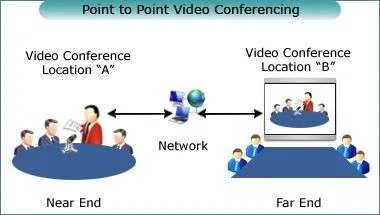
Multipoint Conferencing: Multipoint conferencing involves more than two endpoints or users. This format is typically used for group meetings or discussions involving participants from various locations. Most video conferencing software comes equipped with features that facilitate multipoint conferencing, such as screen sharing, file sharing, and breakout rooms.

Broadcasting or Webcast: Broadcasting, also known as webcasting, is a form of video conferencing where one or more hosts broadcast video and audio content to a large number of viewers or participants. This type of conferencing is commonly used for webinars, live events, and online training sessions.
Decoding Video Conferencing
Video Conferencing: Beyond Just Video Calls
The concept of video conferencing extends far beyond the realm of simple video calls. This powerful communication tool fosters a space for interactive virtual collaboration, replicating a physical meeting room but without geographical constraints. Through video conferencing software, individuals can share ideas, work collaboratively, and even deliver presentations to a large audience, irrespective of where they are located. The interactive nature of video conferencing brings a human-like touch to virtual communication, making remote interactions more engaging and effective.

Different Modes of Video Conferencing
Video conferencing caters to various communication needs through different modes.
Personal Meetings: Ideal for one-on-one discussions, personal meetings often feature a video call between two participants. Be it a catch-up with a colleague or a consultation with a client, personal meetings provide a space for focused, private conversations.

Group Sessions: These involve multiple participants, perfect for team meetings, webinars, or even social gatherings. Most video conferencing software provides tools to manage these sessions effectively, like muting participants or presenting to the group.

Multi-Location Conferences: For organizations spread across multiple locations, video conferencing can connect different branches or teams situated in various geographical areas. This mode fosters better collaboration and decision-making within larger, more spread-out organizations.

Understanding these different modes is crucial as they impact the choice of video conferencing software. In the next section, we will explore the critical features to consider when choosing the ideal web conferencing software for your needs.
Essential Features of Video Conferencing Software
Choosing the right video conferencing software requires a good understanding of the essential features it should provide. Here, we’ve highlighted some of these key features that can enhance your virtual meeting experience:
Video and Audio Quality
High-quality video and audio are the backbone of any video conferencing software. The software should offer High-Definition (HD) video and clear, uninterrupted audio to ensure seamless and effective communication during your meetings.

Screen Sharing Capabilities
The ability to share your screen is crucial in today’s digital meetings. It allows you to effectively present ideas, demonstrate processes, and collaborate on tasks in real-time.
Text Chat
Although video and audio are the primary modes of communication, having a text chat feature is equally important. It enables participants to share quick thoughts, questions, or useful links without interrupting the ongoing conversation.
File Sharing and Collaboration Tools
File sharing capabilities allow users to exchange documents and other files during a meeting, enhancing collaboration and efficiency. Additional collaboration tools may include virtual whiteboards for brainstorming or annotation tools for highlighting key points on shared documents or screens.
Integration with Other Software
Good video conferencing software should integrate smoothly with other productivity tools, such as email clients, project management tools, or Customer Relationship Management (CRM) systems. This interoperability can improve productivity and streamline your workflows.

Recording and Playback
The ability to record meetings is another important feature. Recording allows participants to review meeting content later or share the meeting with those who could not attend. Playback features should be easy to use and offer options for pausing, rewinding, and fast-forwarding.
Popular Video Conferencing Software
When it comes to choosing the right software for video conferencing, there are several robust and popular options available on the market. Here’s a snapshot of some of the most widely used platforms.
1. Zoom
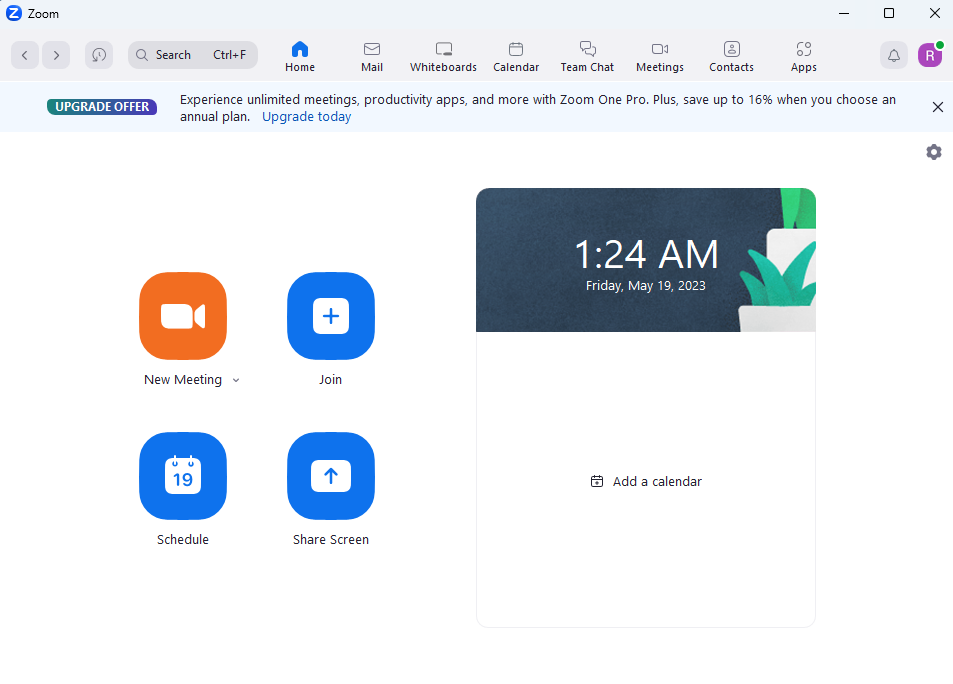
Zoom is a cloud-based video conferencing service you can use to meet virtually with others, either by video or audio-only or both. It offers high-definition video and audio quality, supports large meetings with hundreds of participants, and provides features like screen sharing, file sharing, and meeting recording.
2. Microsoft Teams
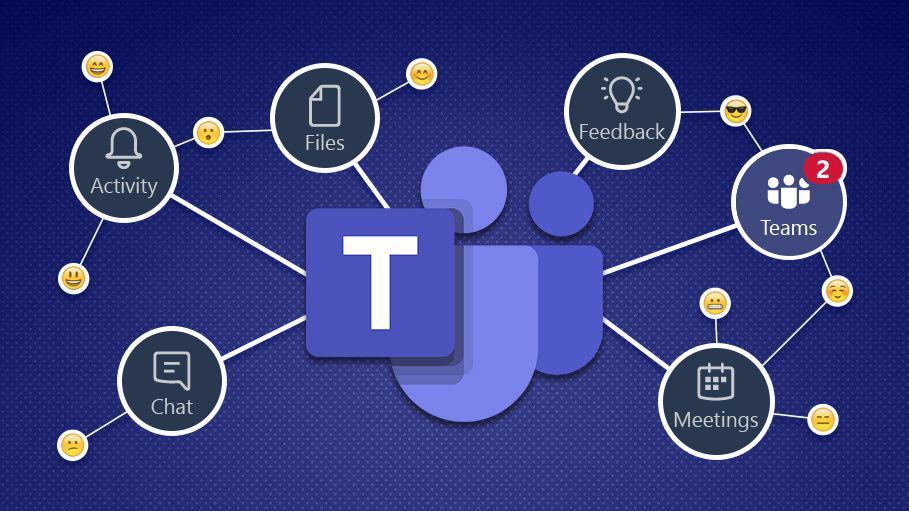
Microsoft Teams is a unified communication and collaboration platform that combines chat, video meetings, file storage, and application integration. It’s deeply integrated with Office 365, making it an excellent choice for organizations already using Microsoft’s productivity suite.
3. Google Meet
Google Meet, formerly known as Google Hangouts Meet, is a video communication service developed by Google. It is one of the leading video conferencing software apps on the market, especially for businesses using Google Workspace (formerly G Suite). Google Meet is known for its easy-to-use interface and robust security features.

4. Cisco Webex
Cisco Webex is a reliable and mature video conferencing solution used by businesses of all sizes. It offers a suite of video conferencing, team collaboration, and calling capabilities. Cisco Webex meetings is known for its excellent video quality, security, and comprehensive integrations.

5. Skype
Skype is one of the oldest players in the the video calling and conferencing field, owned by Microsoft. Known for its simplicity and effectiveness, Skype provides video chat and voice call services, along with instant messaging, file transfer, and screen sharing.

Specialized Video Conferencing Software
While general-purpose video conferencing software suits most needs, some sectors require specialized solutions. Let’s explore some software that has been tailored to meet the unique needs of certain industries.
Video Conferencing for Education:
In the realm of education, video conferencing has played a vital role in enabling remote learning and fostering virtual classrooms.
Blackboard Collaborate is a real-time video conferencing tool designed specifically for education. It allows teachers and students to share files, collaborate on documents, and use a virtual whiteboard.
Adobe Connect is another powerful tool in the education sector, offering features like breakout rooms, polls, and quizzes to create interactive learning experiences.
Video Conferencing for Healthcare:
Healthcare has also benefited significantly from video conferencing technology, primarily through telemedicine.
Doxy.me is a simple and secure telemedicine solution designed to make telehealth accessible to all. It enables healthcare providers to meet with patients remotely, improving access and convenience.
VSee, another dedicated telehealth platform, offers video conferencing along with other features like patient scheduling and electronic health record integration.

Video Conferencing for Creative Industries:
The creative industry, including sectors like film, television, and advertising, also have specific needs that standard video conferencing tools might not meet.
Frame.io stands out in this sector as a video review and collaboration platform. It allows creative teams to share and review media files, collaborate in real-time, and streamline the video production process.

Evaluating the Performance of Video Conferencing Software
When selecting a video conferencing tool, the platform’s performance and reliability are critical factors to consider. Here are some areas you should examine:
Quality of Service:
The quality of audio and video during a video conference can make or break the experience. Key aspects to look out for include:
Latency: This is the delay between the transmission and receipt of data. Lower latency leads to more real-time communication.
Jitter: Jitter refers to the variation in latency. High jitter can lead to a choppy audio or video experience.
Packet Loss: This is when data doesn’t reach its destination. High packet loss can lead to gaps in audio or video.
Many video conferencing tools now offer HD video and audio, but their effectiveness can be influenced by these three factors.
Scalability and Maximum Participant Capacity
Depending on the size of your organization or the scale of your meetings, you may need to consider the software’s ability to accommodate large numbers of participants. Some tools are designed for small team collaborations, while others can also host meetings or webinars for thousands of participants.
Compatibility with Different Devices and Operating Systems
To ensure accessibility for all users, the chosen software should be compatible with a range of devices (computers, tablets, smartphones) and operating systems (Windows, macOS, iOS, Android). It’s also a plus if the software provides a browser-based free version that doesn’t require any downloads or installations.
Security and Privacy Features
In today’s digital age, the security and privacy of communication tools are paramount. Look for features such as end-to-end encryption, password-protected meetings, and compliance with relevant regulations (like GDPR or HIPAA).
Video Conferencing Software for Different Devices
In today’s interconnected world, it’s crucial to have video conferencing software that is compatible with various devices. Let’s explore the importance of cross-platform compatibility and take a closer look at the quality and availability of mobile apps.
Software for Desktop and Mobile Devices
Video conferencing software should cater to both desktop and mobile devices to ensure seamless communication across different platforms.
Desktop Devices: Most video conferencing platforms offer software applications that can be installed on desktop computers or laptops. These applications provide access to the full range of features and functionalities, including high-quality video and audio, screen sharing, and collaboration tools.
Mobile Devices: With the increasing reliance on smartphones and tablets, having video conferencing software that supports these mobile device is essential. Mobile apps allow users to join meetings on the go, participate in discussions, and access shared content.

Importance of Cross-Platform Compatibility
Cross-platform compatibility ensures that users can seamlessly switch between different devices without sacrificing functionality or user experience. It allows participants to join meetings from their preferred device, whether it’s a desktop computer, laptop, smartphone, or tablet.
Cross-platform compatibility also promotes collaboration and inclusivity by enabling participants to connect regardless of the devices they use. This flexibility is particularly valuable for remote teams, as it accommodates diverse work setups and preferences.
A Look into the Quality and Availability of Mobile Apps
The quality and availability of mobile apps play a significant role in the overall video conferencing experience. When evaluating video conferencing software, consider the following aspects of mobile app:
User Interface and Features: Mobile app should offer a user-friendly interface that makes it easy to navigate and access key features. Look for features such as chat, screen sharing, and the ability to join meetings with a single tap.
Performance and Stability: A well-optimized mobile app should deliver stable performance, reliable connectivity, and smooth video and audio playback. The app should be able to handle various network conditions and adapt to bandwidth fluctuations.
Compatibility and Updates: Ensure that the mobile app is compatible with your specific operating system (iOS or Android) and that it receives regular updates to address security vulnerabilities and improve performance.
Video Conferencing for Businesses
Video conferencing has become an indispensable tool for businesses, offering numerous benefits for small businesses and remote team members. Additionally, it enables effective group meetings across multiple locations. Let’s delve into these aspects:
The Role of Video Conferencing in Small Businesses
In the realm of small businesses, video conferencing has a significant impact on communication and collaboration. It allows small teams to connect and collaborate seamlessly, irrespective of their geographical locations. Video conferencing bridges the gap between team members, facilitating real-time discussions, brainstorming sessions, and decision-making processes. By eliminating the need for travel, it reduces costs and boosts productivity, enabling small businesses to compete in the global market.

Benefits of Using Video Conferencing for Remote Team Members
Remote work has become increasingly prevalent, and video conferencing plays a vital role in connecting remote team members. Here are some benefits it offers:
Enhanced Collaboration: Video conferencing fosters collaboration by providing face-to-face interactions, improving communication, and building stronger relationships among remote team members.
Increased Productivity: By eliminating the need for travel and allowing remote team members to join meetings from their preferred locations, video conferencing saves time and enhances productivity.
Cost Savings: Video conferencing reduces travel expenses and overhead costs associated with physical meetings, making it an economical choice for businesses.
Flexibility and Work-Life Balance: Remote team members can participate in meetings without the need for extensive travel, allowing for greater work-life balance and flexibility.
How to Facilitate Group Meetings across Multiple Locations
Group meetings across multiple locations require efficient coordination and communication. Video conferencing provides a powerful solution for bringing teams together. Here are some tips for facilitating effective group meetings:
Choose the Right Software: Select a video conferencing software that supports large-scale meetings and provides features like screen sharing, breakout rooms, and collaboration tools.
Plan Ahead: Set clear objectives, create an agenda, and communicate it in advance to all participants. Ensure everyone has the necessary meeting details and access to the video conferencing platform.
Optimize Technical Setup: Test the video conferencing setup in advance, ensuring a stable internet connection, high-quality audio and video, and compatible devices across multiple locations.
Establish Meeting Etiquette: Encourage active participation, set expectations for engagement.

Reviewing Video Conferencing Software
When selecting video conferencing software, it is essential to consider software reviews, choose the best fit for your needs, and understand the differences between free and paid plans. Let’s explore these aspects:
The Importance of Software Reviews
Software reviews play a crucial role in the decision-making process when choosing video conferencing software. They provide insights into the experiences of other users, highlighting the strengths and weaknesses of different platforms. By reading reviews, you can gain valuable perspectives and make an informed decision based on the real-life experiences of others.
How to Choose the Best Video Conferencing Software for Your Needs?
Choosing the best video conferencing software depends on several factors. Here’s a guide to help you make the right decision:
Identify Your Needs: Determine your specific requirements and prioritize features that are essential for your business or personal use. Consider factors such as the number of participants, the need for screen sharing or file sharing, and compatibility with your devices.
Research and Compare: Research different video conferencing software options, compare their features, pricing plans, and user reviews. Look for software that aligns with your needs and has positive reviews regarding reliability, ease of use, and customer support.
Consider Integration: If you use other software tools or platforms, consider video conferencing software that integrates smoothly with your existing systems. This integration can enhance your workflow and improve productivity.
Trial Periods or Free Plans: Take advantage of trial periods or free plans offered by video conferencing software providers. This allows you to test the software firsthand, evaluate its user experience, and assess whether it meets your requirements.
Seek Recommendations: Consult peers, colleagues, or industry experts who have experience with different video conferencing software. Their insights and recommendations can provide valuable guidance in making your decision.

Understanding the Difference Between Free and Paid Plans
Video conferencing software often offers both free and paid plans. Here’s what you should consider:
Free Plans: Free plans typically have limitations, such as restrictions on the number of participants or meeting duration. They may also offer fewer features compared to paid plans. Free plans can be suitable for individuals or small teams with basic requirements.
Paid Plans: Paid plans provide additional features, higher participant limits, extended meeting durations, and dedicated customer support. They are more suitable for larger organizations or those with advanced collaboration needs.
Evaluate your budget, the scale of your meetings, and the specific features you require to determine whether a free or paid plan aligns with your needs.
Hardware Considerations for Video Conferencing Solution
When setting up a video conferencing system, it’s crucial to consider the hardware aspects. Let’s explore video conferencing hardware, the role of conference room systems, and how to choose the right hardware for your needs.
Exploring Video Conferencing Hardware
Video conferencing hardware refers to the physical components that enable high-quality video and audio communication. Here are some key hardware components commonly used in video conferencing setups:
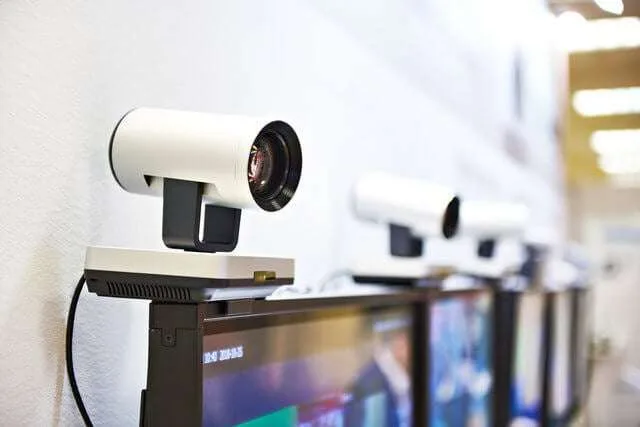
Cameras: High-definition cameras capture video footage during video conferences. They range from built-in webcams on laptops to standalone cameras that offer advanced features like zooming and panning.
Microphones: Clear audio is essential for effective communication. External microphones can capture audio from multiple participants in a conference room, ensuring everyone’s voice is heard clearly.
Speakers: Good quality speakers or speakerphones are necessary for clear audio playback during video conferences. They ensure that all participants can hear the conversation without any distortion.
Displays: Displays, such as monitors or televisions, showcase the video feed during video conferences. They can range from small displays for individual use to large displays for conference rooms.
The Role of Conference Room Systems
Conference room systems are specialized video conferencing setups designed for larger meeting spaces, such as boardrooms or conference rooms. These systems often integrate multiple hardware components and software to create a seamless video conferencing session and experience. Conference room systems typically include:
Dedicated Cameras: Conference room systems use PTZ (Pan-Tilt-Zoom) cameras or multiple cameras to capture the entire room and focus on the active speaker.
Professional Audio Solutions: They feature advanced audio equipment, such as ceiling microphones or beamforming microphones, to ensure optimal audio quality and coverage in larger spaces.
Room Controls: Conference room systems often come with room control systems that enable users to manage the video conferencing setup, control displays, adjust audio settings, and switch between different sources.
Choosing the Right Hardware for Your Needs
When selecting video conferencing hardware, consider the following:
Room Size: Assess the size of your meeting space to determine the appropriate camera angle, microphone coverage, and speaker placement.
Audio Quality: Invest in good quality microphones and speakers to ensure clear and crisp audio during video conferences.
Integration: Choose hardware that seamlessly integrates with your chosen video conferencing software, allowing for easy setup and compatibility.
Budget: Consider your budget and prioritize hardware components based on your requirements. Balance cost-effectiveness with the desired quality and features.
To make the most out of your video conferencing experience, it’s essential to follow best practices. Let’s explore strategies and software features for scheduling video conferences, video conference etiquette, and leveraging breakout rooms for group meetings.
Scheduling Video Conferences: Strategies and Software Features
Plan Ahead: Schedule video conferences in advance to allow participants to prepare and avoid conflicts. Consider time zone differences if attendees are located in different regions.
Software Calendar Integration: Utilize software calendar integration, such as Google Calendar or Microsoft Outlook, to streamline scheduling. This allows participants to receive calendar invites with meeting details and reminders.
Automatic Reminders: Opt for video conferencing software that sends automatic reminders to participants before the scheduled meeting. This helps ensure attendance and minimizes the risk of missed meetings.
Scheduling Assistant: Some video conferencing software offers scheduling assistants that suggest available meeting times based on participants’ availability, simplifying the process of finding a suitable meeting slot.
Video Conference Etiquette:
Dress Professionally: Dress appropriately for video conferences, as you would for an in-person meeting. It helps create a professional atmosphere and shows respect for other participants.
Prepare Your Environment: Choose a quiet, well-lit location for your video conferences. Minimize background noise and ensure that your background is tidy and professional.
Test Your Equipment: Before the meeting, test your audio, video, and internet connection to ensure they are working correctly. This avoids technical disruptions during the conference.
Active Engagement: Stay engaged and actively participate in the conversation. Avoid distractions, actively listen, and contribute to the discussion.
Respect Speaking Turns: Allow others to speak without interruption. Use features like “Raise Hand” or wait for your turn to avoid talking over others.

Leveraging Breakout Rooms for Group Meetings
Organize Large Meetings: Use breakout rooms to divide larger meetings into smaller groups. This allows for focused discussions and collaboration among specific team members.
Facilitate Teamwork: Assign a moderator or facilitator to each breakout room to guide discussions and ensure everyone has an opportunity to participate.
Easy Transition: Choose video conferencing software that offers seamless transition to breakout rooms with just a few clicks. This simplifies the process for both hosts and participants.
Time Management: Set a specific time limit for breakout sessions and communicate it to participants. This helps ensure that discussions stay on track and meetings remain efficient.
The Future of Video Conferencing Tools
As video conferencing continues to evolve, the future holds exciting possibilities. Let’s explore the potential impact of AI on video conferencing and delve into advanced features like virtual whiteboards, cloud recording, and more.
AI and Video Conferencing: The New Normal?
Artificial Intelligence (AI) is poised to revolutionize the video conferencing landscape, offering new capabilities and enhancing user experiences. Here’s how AI could shape the future of video conferencing:
Automated Transcriptions and Translation: AI-powered speech recognition can automatically transcribe video conference conversations in real-time, facilitating accessibility and enabling language translation for participants.
Intelligent Virtual Assistants: AI-driven virtual assistants can assist with meeting management, scheduling, note-taking, and even provide real-time suggestions during video conferences, enhancing productivity and efficiency.
Background Noise Suppression: AI algorithms can identify and suppress background noise, ensuring clearer audio quality and minimizing distractions during video conferences.
Facial Recognition and Emotion Analysis: AI technology can analyze facial expressions and gestures, enabling more engaging and interactive virtual meetings by capturing participants’ reactions and emotions.

Exploring Advanced Video Conferencing Features:
Video conferencing tools are continually evolving, offering advanced features to enhance collaboration and productivity. Here are some noteworthy features to look out for:
Virtual Whiteboard: Virtual whiteboards allow participants to collaborate in real-time, making it easier to brainstorm, draw diagrams, and share ideas visually during video conferences.
Cloud Recording: Cloud recording enables automatic and secure storage of video conference recordings, making them easily accessible for review, sharing, or reference after the meeting.
Interactive Polls and Surveys: These features facilitate real-time feedback and engagement by allowing hosts to create and conduct polls or surveys during video conferences.
Gesture Recognition: Advanced video conferencing tools can recognize hand gestures, enabling participants to interact with on-screen content, annotate, or navigate through presentations.
As video conferencing tools continue to innovate, these advanced features have the potential to revolutionize collaboration and create more immersive meeting experiences.
FAQs – Software for video Conferencing
A: The most popular software for video conferencing includes Zoom, Microsoft Teams, Google Meet, Cisco Webex, and Skype.
A: Five video conferencing software options are Zoom, Microsoft Teams, Google Meet, Cisco Webex, and Skype.
A: Video conferencing solutions refer to software platforms or tools that enable real-time audio and video communication between individuals or groups in remote locations.
A: The three types of conferencing are point-to-point conferencing, multipoint conferencing, and broadcasting or webcast conferencing.
A: Some video conferencing apps that offer free plans include Zoom, Microsoft Teams (free version), Google Meet (free with limitations), Cisco Webex (free plan), and Skype (free for personal use).
A: Video conferencing programs are software applications or platforms that enable individuals or groups to conduct virtual meetings and communicate through audio and video channels.
A: Zoom is currently one of the most popular video conferencing platforms, known for its ease of use and wide range of features.
A: The two main types of video conferencing systems are hardware-based systems, which involve dedicated equipment and infrastructure, and software-based systems, which rely on software applications and internet connectivity.
A: To set up a free video conferencing conference for your business, you need to choose a video conferencing software, create an account, schedule a meeting, invite participants, and ensure you have the necessary hardware (e.g., camera, microphone, speakers) and a stable internet connection.
A: Zoom is a popular video meeting software known for its user-friendly interface, reliable performance, and extensive features.
A: The number 1 video conferencing app currently is Zoom, which has gained widespread popularity for its ease of use and broad range of features.
A: Yes, Zoom has gained more popularity than Skype in recent years, largely due to its user-friendly interface, robust features, and reliability.
A: Remote video conferencing refers to the practice of conducting video conferences with participants who are located in different geographical locations, allowing for real-time communication and collaboration.
A: A virtual meeting and a video conference are often used interchangeably, referring to the same concept of conducting meetings online through audio and video channels. However, a virtual meeting can encompass various forms of communication, including text-based chat and collaborative document sharing, while a video conference specifically focuses on real-time audio and video interactions.
Summary:
Advances in video conferencing have been integral in promoting electronic communications for businesses, educational institutions, and human services. No matter the purpose of a a video conferencing providers or call, there are countless useful features and options out there to make it effective and reliable. It is clear that the video conferencing market only stands to grow in the near future as technology continues to progress . While bigger and more expensive hardware devices may be ideal for larger scale meetings, many companies and organizations are simply investing in free or low-cost basic plans to get started. As we have seen, there is no denying that video conferencing has become an indispensable component of business today, allowing us to stay connected regardless of distance or other restrictions. With so much potential for growth, we can anticipate exciting developments in this sector for years to come!
We explore innovative tools that enhance virtual communication. One such tool is Synthesia, an AI video creation platform that enables effortless creation of professional videos. Discover the power of Synthesia in our article on Synthesia – The AI video creation platform. Additionally, elevate your virtual meetings with the coolest screen projectors for the office, home, or outdoors in 2026. Explore our review of top projectors. These tools will enhance your video conferencing experience and make your presentations more engaging.