In today’s competitive job market, small businesses need to be agile, efficient, and strategic in their recruiting processes. Unlike large corporations with dedicated HR departments and substantial hiring budgets, small businesses often operate with limited resources, making every hire a crucial investment. This is where small business recruiting software comes into play, offering affordability and effectiveness that can significantly benefit small business owners.
Recruiting software streamlines the hiring process by automating repetitive tasks, providing tools for sourcing and screening candidates, and organizing applicant information. For small companies, the right recruiting software can make all the difference by saving time, reducing hiring costs, and improving the overall candidate experience.

In this comprehensive guide, we’ll explore everything small businesses need to know about recruiting software, from the essential features and benefits to cost considerations and top software solutions. By the end, you’ll understand how recruiting software can transform your hiring process, help you attract top talent, and set your business up for future success.
What is Recruiting Software
Recruiting software is a type of technology designed to streamline and optimize the hiring process for organizations. It automates various tasks, such as job posting, candidate sourcing, and application tracking, to help hiring managers and teams find the best candidates for their job openings. With the rise of digital transformation, recruiting software has become an essential tool for small businesses, enabling them to compete with larger enterprises for top talent.
Understanding Recruiting Software for Small Companies
Recruiting software refers to a suite of tools designed to manage, streamline, and optimize the hiring process. While large organizations often use extensive HR management systems, small businesses need software that aligns with their unique challenges: limited budgets, smaller hiring teams, and an emphasis on efficiency and speed. Small business recruiting software is particularly valuable for its affordability and effectiveness, helping small business owners manage recruitment processes, expand candidate reach, and streamline applicant screening.
For small companies, recruiting software can assist in every step of the recruitment process, from job posting to onboarding. Many platforms are tailored to support small businesses, offering streamlined, easy-to-use features without overwhelming the user with unnecessary options.
Why Small Businesses Have Unique Recruiting Needs
Small businesses face several distinct challenges when it comes to recruitment. They may not have a dedicated HR team, so hiring tasks often fall to managers who have limited time and resources. Small businesses also need to make a big impact with every hire. Unlike larger companies, a poor hiring decision in a small business can have immediate and noticeable effects on productivity and company culture. Additionally, small companies must be mindful of their budgets, often opting for cost-effective tools that still provide maximum value.
Common Challenges in the Hiring Process for Small Businesses
Limited Reach: Small businesses may struggle to reach a broad candidate pool due to limited access to high-traffic job boards and social media platforms.
Time Constraints: Often, hiring managers and business owners are responsible for recruitment, meaning they must juggle hiring with their primary responsibilities.
Budget Limitations: Small businesses typically have less to spend on recruitment and must maximize every dollar.
Need for Cultural Fit: In smaller teams, cultural fit is essential, as one employee’s attitude and work style can significantly impact the whole team.
By understanding these challenges, recruiting software providers have developed tools that simplify and accelerate the recruitment process, making it easier for small businesses to compete for top talent.
Key Benefits of Recruiting Software for Small Companies
Small business recruiting software offers a multitude of benefits for small businesses, helping them manage recruitment processes, streamline the hiring process, and enhance their ability to attract, evaluate, and hire the right candidates.
Streamlining the Recruitment Process
One of the primary benefits of recruiting software is its ability to streamline the recruitment process. From automating job postings to organizing candidate information, recruiting software can reduce the time and effort required for each step of hiring. For instance, applicant tracking systems (ATS) allow hiring managers to view candidate applications in a centralized dashboard, eliminating the need to sift through emails or spreadsheets.
Enhancing Candidate Sourcing and Screening
Recruiting software enables small businesses to expand their candidate sourcing efforts by integrating with multiple job boards and social media platforms. This not only broadens the pool of potential candidates but also ensures that the best-fit candidates are considered. Additionally, screening features like automated resume parsing and pre-assessment tools allow hiring teams to quickly identify qualified applicants, saving valuable time and resources.
Improving Efficiency for Hiring Teams and Managers
For small businesses where hiring duties are often divided among several team members, recruiting software can enhance collaboration. Many platforms offer collaborative tools that allow hiring managers to share notes, tag other team members, and review candidate profiles together. This keeps everyone on the same page and speeds up the decision-making process.
Compliance with Federal Contract and Hiring Regulations
Small businesses involved in federal contracting must comply with strict hiring regulations. Recruiting software can assist in maintaining compliance by tracking all candidate data, documenting every step of the hiring process, and generating reports for federal audits. This not only protects the business legally but also ensures that hiring practices are fair and transparent.
Types of Recruiting Software for Small Companies
Small business recruiting software comes in various forms, each offering unique functionalities tailored to different aspects of the hiring process. Understanding these types can help small businesses choose a solution that meets their specific needs.
Applicant Tracking System (ATS)
An Applicant Tracking System (ATS) is one of the most widely used tools in recruiting software. It provides a centralized hub for managing job applications, tracking candidate status, and communicating with potential hires. ATS platforms allow businesses to automate repetitive tasks like application filtering and candidate communications, which is especially valuable for small companies with limited HR staff.
ATS systems also help ensure that no candidate is overlooked by providing a structured approach to applicant review. For small businesses, a basic ATS with essential features can be a game-changer, offering efficiency without the high costs associated with enterprise-level solutions.
Recruitment Software vs. Hiring Software
While these terms are sometimes used interchangeably, recruitment software and hiring software can have distinct functionalities. Recruitment software often focuses on the broader recruitment process, including sourcing, posting, and candidate relationship management. Hiring software, on the other hand, may emphasize onboarding and integrating new hires into the team.
Small businesses should evaluate whether they need an all-in-one platform or if they could benefit from a more specialized tool. Some platforms, for instance, excel in pre-screening and interview scheduling, while others offer robust onboarding capabilities.
All-in-One vs. Modular Recruiting Software Solutions
Small businesses often prefer all-in-one recruiting solutions, which offer a range of tools in a single platform. These tools typically include job posting, ATS, interview scheduling, and onboarding features. However, modular recruiting solutions allow companies to pick and choose the specific functionalities they need, which can be cost-effective and allow for scalability.
For example, a company might start with an ATS and later add an onboarding module as their team grows. Modular software can provide flexibility and ensure that the company only pays for what it uses.
Key Features of Recruiting Software for Small Businesses
For small companies, choosing small business recruiting software with the right features is essential to optimizing the hiring process. Below are some of the most beneficial features to look for in recruiting software designed for small businesses.
Customizable Career Sites and Branded Career Pages
Customizable career sites allow small businesses to create a professional online presence that reflects their brand and attracts candidates. These branded pages can be tailored to showcase company culture, values, and benefits, helping small businesses stand out from competitors. With the right design and messaging, a career site can serve as a powerful recruitment tool, engaging candidates from the moment they visit.
Integration with Multiple Job Boards and Job Posting Tools
The ability to post jobs across multiple job boards with just a few clicks can significantly improve the reach of small businesses. Many recruiting platforms integrate with major job sites like Indeed, LinkedIn, and niche job boards relevant to specific industries. This feature allows small businesses to maximize visibility for job openings without manually posting to each site, saving time and ensuring consistency across platforms.
Interview Scheduling, Candidate Communication Tools, and Employee Referrals
Interview scheduling and communication tools are essential for keeping candidates engaged and reducing the time-to-hire. Automated scheduling options allow candidates to select interview slots that work for them, while in-platform communication tools keep all interactions organized. Additionally, employee referral programs incentivize current employees to refer qualified candidates, which can be an efficient way for small businesses to find talent.
Talent Relationship Management and Candidate Data Handling
Talent Relationship Management (TRM) tools help businesses maintain relationships with potential candidates, even if they aren’t hired right away. This is especially beneficial for small businesses that anticipate future hiring needs and want to keep a pipeline of qualified candidates. TRM features can help track past applicants, enabling hiring teams to reach out to them when relevant roles open up.
Reporting and Analytics for Hiring Metrics and Future Hiring Needs
Data-driven insights are vital for making informed hiring decisions. Reporting and analytics features allow small businesses to track key metrics such as time-to-hire, cost-per-hire, and source of hire. This data can help refine recruiting strategies and allocate resources effectively, ensuring that the company is prepared for future hiring needs.
Selecting the Right Recruiting Software for Small Companies
Choosing the right recruiting software for your small business is a strategic decision that can directly impact hiring efficiency, candidate experience, and overall business growth. Here are essential factors to consider when evaluating and selecting recruiting software for a small company:
Factors to Consider When Choosing Recruiting Software
Budget: Small businesses often operate on tight budgets, so cost-effectiveness is crucial. Evaluate the software’s pricing structure, including any additional costs for add-ons, support, or integrations. Look for software that provides the essential features you need without exceeding your budget.
Features and Functionalities: Prioritize the features that align with your business needs. If your primary goal is to simplify candidate tracking, focus on Applicant Tracking System (ATS) capabilities. For broader functionality, consider software with job posting tools, interview scheduling, and analytics.
Ease of Use: Recruiting software should simplify, not complicate, the hiring process. Look for a platform with an intuitive, user-friendly interface that requires minimal training, enabling your team to quickly adopt and use the software.
Scalability: As your business grows, your recruitment needs will evolve. Select software that can grow with you, offering flexibility and additional modules if needed. Many platforms offer scalable plans designed to accommodate small businesses as they expand.
Compliance and Security: Small businesses must adhere to federal and state hiring regulations. Recruiting software that includes compliance management features can help you avoid potential legal issues by tracking equal employment practices, candidate data security, and reporting requirements.
Comparing Top Recruiting Software Solutions Based on Key Factors
For small businesses, recruiting software that offers flexible pricing and essential features, like Breezy HR and JazzHR, are popular choices. Both platforms offer robust tools tailored for small businesses, such as job posting, candidate tracking, and interview scheduling, without the high costs associated with enterprise software. A side-by-side comparison of popular tools can help you decide which solution best meets your needs and budget.
Understanding Software Costs: Licensing Fees, Implementation, and Support
When budgeting for recruiting software, it’s essential to consider all associated costs. Many platforms charge a base licensing fee, with additional costs for premium features or modules. Implementation costs cover training and software setup, while support fees may apply for ongoing customer assistance. Understanding these expenses upfront helps prevent surprises down the line and ensures your chosen solution aligns with your budget.
Top Recruiting Software Solutions for Small Companies
Finding the right recruiting software requires comparing top solutions to see which features, costs, and integrations align with your business needs. Here are some highly-rated recruiting software options tailored to small businesses:
1. JazzHR
JazzHR offers a robust recruiting platform with key features like customizable career pages, ATS capabilities, and integrations with popular job boards. It’s known for being affordable and user-friendly, making it ideal for small businesses that need a streamlined hiring process.
Key Features: ATS, interview scheduling, branded career pages, job board integrations.
Ideal For: Small businesses looking for a cost-effective, comprehensive recruiting solution.
2. Breezy HR
Breezy HR is a recruiting software solution with an intuitive interface and collaborative tools. It allows small businesses to manage job postings, screen candidates, and schedule interviews, making it easy to coordinate hiring efforts across teams.
Key Features: Interview scheduling, candidate sourcing, team collaboration tools, automated workflows.
Ideal For: Small teams that want collaborative tools and automated hiring workflows.

3. Freshteam by Freshworks
Freshteam is an ATS designed for small to medium businesses. It offers robust ATS functionality, customizable career pages, and talent pool management to help small businesses streamline hiring.
Key Features: ATS, customizable career pages, job posting, talent pool management.
Ideal For: Companies needing a straightforward ATS with talent pool features.

4. Workable
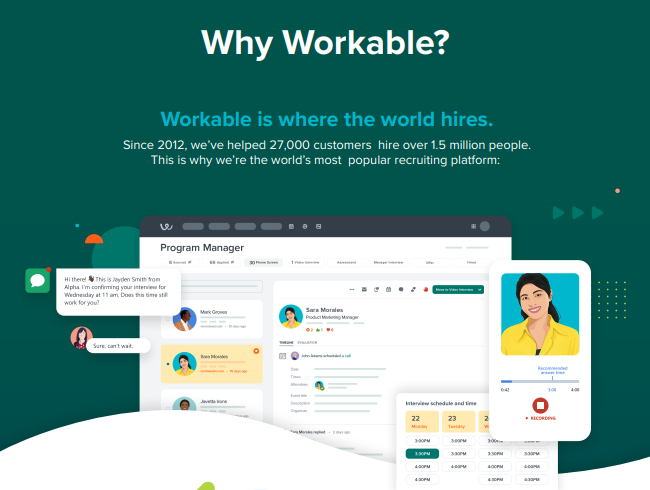
Workable provides all-in-one recruiting software that includes job posting, candidate tracking, and AI-powered sourcing tools. Although slightly more expensive, Workable offers a range of advanced features for small businesses ready to invest in a more sophisticated solution.
Key Features: AI sourcing, ATS, interview scheduling, analytics.
Ideal For: Small businesses seeking an advanced recruiting solution with AI capabilities.
The Recruitment Process: How Software Improves Hiring Efficiency
Recruiting software not only simplifies hiring but also enhances the overall recruitment process by automating repetitive tasks and providing valuable insights. Here’s how recruiting software improves efficiency across each stage of recruitment:
1. Job Posting and Candidate Sourcing
With recruiting software, small businesses can post job openings on multiple job boards with just a few clicks. This broadens their reach and increases the likelihood of attracting top talent. Software integrations with major job sites like Indeed and LinkedIn allow companies to streamline the sourcing process, maximizing visibility and saving time.
2. Screening and Pre-Assessment
Recruiting software includes tools for automating initial screenings, such as resume parsing and pre-assessment tests. These tools help hiring managers quickly identify candidates who meet the qualifications, eliminating those who do not, which speeds up the decision-making process and ensures a more efficient use of resources.
3. Interview Scheduling and Communication
Scheduling interviews can be a logistical challenge, but recruiting software allows candidates to select from available times, simplifying the process for both parties. The software often includes automated reminders and in-platform messaging, keeping candidates engaged and informed throughout the process.
4. Collaborative Decision-Making and Feedback Collection
Recruiting software allows team members to collaborate by sharing notes, leaving comments, and discussing candidates within the platform. This centralized feedback system ensures everyone involved in the hiring process stays on the same page, reducing misunderstandings and helping teams make better, quicker decisions.
5. Onboarding New Hires
Some recruiting platforms offer onboarding features that help integrate new hires smoothly. From digital paperwork to orientation scheduling, these tools facilitate a seamless transition for new employees, ensuring they are well-prepared for their roles from day one.
Using Applicant Tracking Systems (ATS) for Small Business Recruiting
An Applicant Tracking System (ATS) is a must-have for small businesses looking to manage candidate applications efficiently. ATS software not only tracks applicants but also provides insights and tools that can make hiring more structured and data-driven.
What is an ATS, and Why is it Beneficial for Small Businesses?
An ATS is a software solution designed to organize and manage candidate applications. It offers a centralized platform where all candidate information is stored, allowing hiring managers to easily track applicants, move them through different stages of the hiring pipeline, and ensure no one slips through the cracks.
For small businesses, an ATS is particularly valuable because it reduces the manual effort associated with reviewing resumes and communicating with applicants. Many ATS platforms come with automated features that parse resumes, assign scores based on qualifications, and track each candidate’s progress, enabling small businesses to make faster and more informed hiring decisions.
Key Functionalities of an ATS
Resume Parsing and Filtering: ATS software automatically scans resumes, highlighting those that meet specific qualifications, helping hiring managers quickly narrow down the pool.
Candidate Tracking: Each candidate’s journey is tracked from application to hire, ensuring a structured recruitment process and reducing the likelihood of overlooking qualified applicants.
Collaboration Tools: Team members can leave notes, rate candidates, and share feedback within the platform, improving collaboration and speeding up decision-making.
Reporting and Analytics: Data-driven insights provide information on time-to-fill, cost-per-hire, and source of hire, helping companies refine their recruitment strategies over time.
Top ATS Options for Small Companies
Popular ATS options for small businesses include JazzHR, Freshteam, and Breezy HR. These systems offer affordable, easy-to-use solutions with essential ATS features. They allow small businesses to streamline recruitment processes, maintain organized candidate records, and improve overall hiring efficiency.
How Recruiting Software Helps Small Businesses Source Candidates
One of the biggest challenges for small businesses is reaching a large enough pool of qualified candidates. Recruiting software helps by connecting small businesses with multiple job boards and talent pools.
Using Multiple Job Sites and Job Boards to Expand Candidate Reach
Recruiting software enables small businesses to post jobs on several job boards simultaneously, saving time and increasing visibility. For example, tools like Workable and JazzHR allow businesses to post on platforms like Indeed, LinkedIn, and niche job boards, helping them reach diverse talent pools without spending hours posting manually.
Employee Referral Programs as a Sourcing Tool
Employee referrals are one of the most effective ways to find qualified candidates. Many recruiting platforms support referral programs by allowing current employees to submit referrals directly through the software. This feature encourages employee participation, helping small businesses tap into their teams’ networks to find suitable candidates.
Using Candidate Sourcing Tools to Reach Passive Candidates
Beyond job boards, some recruiting software includes candidate sourcing tools that use AI to identify and engage passive candidates—those not actively looking for a job but who may be interested in the right opportunity. AI-driven sourcing tools can identify ideal candidates based on qualifications and experience, proactively reaching out and inviting them to apply.
Enhancing Candidate Screening and Selection
The candidate screening and selection process is pivotal in ensuring the right fit for open roles in small businesses. Recruiting software provides valuable tools to help streamline this process, enabling hiring teams to efficiently and accurately identify top talent.
Automated Screening Tools for Quick Filtering
Automated screening tools, such as resume parsing and AI-driven filtering, help small businesses quickly narrow down candidate lists. These features scan resumes for keywords related to job requirements, preferred qualifications, and experience levels, allowing hiring managers to efficiently sort candidates based on relevance. Automated screening significantly reduces the time needed to review applications and provides an organized list of potential candidates.
Pre-Employment Testing and Skills Assessments
Many recruiting software solutions offer pre-employment assessments, enabling businesses to evaluate candidates’ skills in a controlled, measurable way. These tests may cover technical skills, cognitive abilities, or even personality traits to ensure a good cultural fit. With pre-assessment results, hiring teams gain insights into candidates’ proficiencies, which is particularly valuable when hiring for specialized roles. Assessments also minimize the risk of bias by standardizing the evaluation process.
Video Interviewing for Remote Screening
For small businesses recruiting remote talent or candidates from other locations, video interviewing capabilities are a valuable feature. Many recruiting platforms incorporate video interviews, enabling businesses to screen candidates without scheduling in-person meetings. This feature allows companies to assess verbal communication skills, personality, and professionalism before deciding on in-person interviews, which can save time and resources.
Structured Interview Templates for Consistent Evaluation
Structured interview templates help ensure a consistent evaluation process across all candidates, which is especially useful when multiple team members participate in the hiring process. Recruiting software often includes customizable interview templates with questions tailored to specific roles, allowing hiring managers to standardize assessments and focus on the most relevant criteria.
Improving Job Postings and Job Descriptions with Recruiting Software
Effective job postings and descriptions attract the right candidates and set the foundation for a successful recruitment process. Recruiting software can enhance job postings by offering templates, formatting suggestions, and automated distribution to multiple job boards.
Job Description Templates for Consistency and Clarity
Recruiting software often comes with job description templates tailored for various roles, ensuring that job postings are both detailed and professional. These templates include sections for role requirements, responsibilities, qualifications, and company culture. Consistent, clear job descriptions help candidates understand what’s expected, making it easier to attract the right applicants and reduce mismatched expectations.
Posting Jobs on Multiple Job Boards with One Click
Most recruiting software allows small businesses to post job openings across multiple platforms simultaneously, including popular job boards like Indeed, LinkedIn, and niche sites. This feature eliminates the need to manually post on each site, saving valuable time and ensuring that the job posting reaches a larger audience. It also allows small businesses to track performance across platforms, giving insights into which sites generate the best applicants.
Optimizing Job Descriptions for SEO
Recruiting software can assist in optimizing job descriptions for search engines, ensuring that postings appear in relevant job searches. Using keywords specific to the role and industry, small businesses can improve the visibility of job listings. This is particularly useful for businesses competing with larger companies for top talent, as it maximizes the chances of their job postings being seen by qualified candidates.
Ensuring Compliance and Security in the Hiring Process
Small businesses need to adhere to hiring regulations and protect candidate data, especially if they’re involved in federal contracting. Recruiting software helps ensure compliance with legal requirements and offers security measures to safeguard sensitive information.
Maintaining Compliance with Federal and State Hiring Regulations
Recruiting software can help small businesses comply with federal and state hiring regulations by tracking and documenting each step of the hiring process. This includes keeping records of job postings, candidate evaluations, and hiring decisions to demonstrate fairness and avoid discrimination. Software solutions often have built-in compliance tools, such as EEO reporting, that ensure businesses meet regulatory requirements.
Protecting Candidate Data with Secure Platforms
Data security is crucial when handling sensitive candidate information. Recruiting platforms prioritize secure data storage and encryption, protecting against unauthorized access or data breaches. These measures help safeguard personal details like social security numbers, addresses, and resumes, which are often required during the recruitment process. For small businesses, investing in a secure recruiting platform helps avoid potential legal risks associated with data breaches.
The Role of Hiring Managers and Teams in Software Selection
Choosing the right recruiting software is a team decision that often involves input from hiring managers and HR personnel. Including the hiring team in the software selection process helps ensure that the platform meets their specific needs and aligns with the company’s recruitment goals.
Engaging Hiring Managers in Software Selection
Hiring managers play a crucial role in the recruitment process and will be the primary users of recruiting software. Therefore, involving them in the selection process helps ensure that the chosen software aligns with their daily tasks and requirements. Managers can provide insights into necessary features, such as candidate tracking, reporting, and collaboration tools, that facilitate smoother hiring operations.
Importance of Communication Tools for Team Collaboration
Many recruiting platforms come with communication features that allow team members to share candidate information, feedback, and notes. Collaborative tools keep the entire hiring team informed and streamline communication, ensuring that all stakeholders are aligned on hiring decisions. For small businesses, effective team collaboration is essential to maintaining an efficient recruitment process and making timely decisions.
Keeping Hiring Teams on the Same Page
Recruiting software ensures that all members of the hiring team stay updated on candidate progress and feedback. When teams have a centralized platform for tracking candidates, it reduces the risk of miscommunication and delays, improving overall hiring efficiency.
The Cost of Recruiting Software for Small Businesses
Cost is a key consideration for small businesses when choosing recruiting software. Understanding the full spectrum of expenses associated with software platforms helps businesses make informed decisions and maximize their investment.
Understanding Recruiting Software Costs: Licensing Fees, Implementation, and Support
Recruiting software costs vary widely depending on features, user licenses, and support requirements. For most platforms, basic licensing fees cover core functionalities, but additional features or users may incur extra charges. Implementation costs are also common, as setting up the software and training employees can require additional resources. Many providers also charge for ongoing customer support, especially if premium assistance is needed.
Budgeting for Recruiting Software: Cost-Saving Tips
To make recruiting software more affordable, small businesses can consider platforms that offer scalable plans or tiered pricing. Many providers offer basic packages with essential tools for smaller businesses, allowing them to upgrade as their recruitment needs grow. Some software also offers a free trial or freemium version, enabling companies to test the software before making a full commitment. Additionally, bundling recruiting software with other HR tools can sometimes offer cost savings.
The ROI of Investing in Quality Recruiting Software
Investing in recruiting software can yield a high return on investment by reducing hiring times, improving candidate quality, and saving costs associated with manual recruitment tasks. Over time, the efficiencies gained through automation and improved candidate sourcing can help small businesses reduce turnover and build a strong workforce, ultimately boosting productivity and profitability.
Advanced Features in Modern Recruiting Software
As recruitment technology evolves, new features are constantly being introduced to enhance the hiring process. Advanced features like AI-driven candidate matching, predictive analytics, and branded career pages add value by making recruitment more strategic and data-driven.
AI-Powered Candidate Matching and Predictive Analytics
AI-driven candidate matching uses machine learning algorithms to identify candidates who best fit the job description and company culture. Predictive analytics goes a step further by analyzing past hiring data to forecast future hiring needs and identify successful hiring strategies. For small businesses, these tools can drastically improve the quality of hires by prioritizing candidates who are most likely to succeed.
Branded and Customizable Career Pages
Recruiting software often includes tools to create branded career pages that showcase a company’s unique culture and values. Customizable pages allow businesses to highlight employee benefits, company mission, and workplace culture, giving candidates a more engaging experience and encouraging applications from those who resonate with the brand.
Automated Interview Scheduling and Candidate Reminders
Automated scheduling tools enable candidates to select interview times that work for both them and the hiring team, reducing back-and-forth communication. Automated reminders also ensure that candidates show up on time, creating a more efficient scheduling process.
Leveraging Recruiting Software to Build Company Culture
A strong company culture can be a competitive advantage in attracting top talent. Recruiting software can support small businesses in showcasing their company culture throughout the recruitment process.
Promoting a Positive Employer Brand
Branded career pages and customizable job postings allow small businesses to promote their unique company culture and values, helping them attract candidates who are more likely to align with the organization’s mission. By giving candidates a glimpse of the company culture, businesses increase the likelihood of finding employees who fit in well and stay long-term.
Integrating Culture into the Hiring Process
Recruiting software often includes personality assessments and cultural fit questionnaires, which can help evaluate candidates’ compatibility with the company’s culture. Including these elements in the hiring process ensures that new hires will not only meet the technical requirements of the job but also contribute positively to the team dynamics and company environment.
Examples of How Small Businesses Showcase Culture via Recruiting Tools
Small businesses can use social media integrations to display photos of company events, highlight employee testimonials, or show off office perks. Career pages with video testimonials from employees or “day-in-the-life” videos can give candidates a more authentic view of the work environment, strengthening the employer brand and attracting talent that aligns with the company culture.
Top Recruiting Software Trends for 2024 and Beyond
As technology advances, recruiting software continues to evolve, offering new capabilities to improve hiring processes. Staying up-to-date with these trends enables small businesses to stay competitive in attracting top talent, even against larger companies with more resources.
1. Artificial Intelligence (AI) and Machine Learning in Recruiting
AI and machine learning are increasingly integrated into recruiting software to enhance candidate sourcing, screening, and engagement. For example, AI-powered tools can analyze a candidate’s profile, past experiences, and skills to predict their suitability for specific roles. This trend helps small businesses save time by automatically ranking applicants based on fit, allowing hiring teams to focus on interviewing the best matches.
2. Predictive Analytics for Strategic Hiring
Predictive analytics in recruiting software uses data to forecast future hiring needs, allowing small businesses to proactively plan their recruitment efforts. By analyzing patterns in hiring data, software can recommend when to ramp up hiring efforts or which positions may require new talent in the near future. This strategic insight enables small businesses to maintain a steady talent pipeline and avoid staffing shortages.
3. Enhanced Mobile Accessibility
Mobile-friendly recruiting software is essential as more job seekers rely on mobile devices to browse job listings and submit applications. Many platforms now offer mobile apps or mobile-optimized interfaces, enabling candidates to apply, communicate, and even schedule interviews from their phones. This convenience can significantly improve candidate experience, especially for younger, tech-savvy talent.
4. Focus on Candidate Experience
As competition for top talent grows, providing an exceptional candidate experience has become a priority. Many recruiting software solutions are incorporating features that streamline the application process, offer real-time communication, and provide updates on application status. By focusing on candidate experience, small businesses can leave a positive impression, making it more likely for candidates to accept offers.
5. Integrations with Broader HR Systems
Recruiting software increasingly integrates with broader HR systems, such as onboarding, payroll, and performance management platforms. These integrations streamline HR workflows and reduce duplicate data entry, creating a seamless transition from candidate to employee. For small businesses, these integrations mean a smoother onboarding process and simplified HR operations.
6. Virtual Reality (VR) and Augmented Reality (AR) for Remote Recruiting
Although still emerging, VR and AR are beginning to make their way into recruiting. These technologies allow candidates to take virtual office tours or participate in simulated work environments. For small businesses offering remote work, VR can provide candidates a sense of company culture and workplace setting without needing to visit in person.
Best Practices for Implementing Recruiting Software in Small Companies
Once a small business selects the right recruiting software, implementing it effectively is crucial to maximizing its benefits. The following best practices can help ensure a smooth transition and successful adoption across the team.
1. Getting Started with a New Recruiting Platform
Start with a step-by-step implementation plan that includes key phases: setup, data migration, user training, and testing. Ensure that all team members understand the software’s features and how it aligns with your business’s recruitment goals. Assign a project manager or software champion to oversee the process and address any issues that arise.
2. Training and Onboarding for the Hiring Team
Proper training is essential to ensure that hiring managers and team members feel comfortable using the new software. Many providers offer onboarding and support services, including tutorials and customer assistance. Schedule training sessions to walk the team through essential features like job posting, applicant tracking, and interview scheduling, and encourage questions to foster confidence and proficiency.
3. Developing a Recruitment Workflow within the Software
Recruiting software allows small businesses to create structured workflows for each stage of recruitment. Establish a consistent process for posting jobs, reviewing applicants, conducting interviews, and making offers. By having a defined recruitment workflow within the software, hiring teams can ensure a smooth, standardized process for each candidate, improving both efficiency and experience.
4. Encouraging Collaboration and Feedback Collection
Recruiting software includes collaboration tools, such as shared notes, candidate rating, and comment sections, that allow team members to provide feedback. Encourage active collaboration among hiring managers and stakeholders, as it speeds up decision-making and ensures a more thorough evaluation of each candidate.
5. Regularly Reviewing and Optimizing Usage
Once the software is fully implemented, conduct regular reviews of its performance and how it meets your team’s needs. Use reporting and analytics tools to assess hiring metrics, such as time-to-fill and cost-per-hire, and make adjustments as needed. Optimizing usage can involve tweaking workflows, exploring advanced features, or even upgrading the plan as your hiring needs grow.
Common Challenges and Solutions
Despite the benefits of recruiting software, small businesses may face several challenges when implementing and using these solutions. Here are some common challenges and solutions:
Challenge: Limited budget and resources
Solution: Look for affordable recruiting software solutions that offer flexible pricing plans and scalable features. Many platforms provide tiered pricing, allowing small businesses to start with basic functionalities and upgrade as needed.
Challenge: Difficulty in finding the right candidates
Solution: Utilize candidate sourcing features, such as job posting on multiple job boards and social media integration, to reach a wider pool of candidates. Leveraging these tools can significantly expand your reach and attract diverse talent.
Challenge: Inefficient application tracking and management
Solution: Implement an applicant tracking system (ATS) to streamline and automate the application tracking process. An ATS can help organize candidate information, track their progress, and ensure no applicant is overlooked.
Challenge: Ensuring federal contract compliance
Solution: Choose recruiting software that offers federal contract compliance programs and features to ensure adherence to regulations. These tools can help maintain accurate records and generate necessary reports for audits.
By understanding these common challenges and solutions, small businesses can better navigate the recruiting software landscape and find the best solution for their hiring needs.
FAQs on Recruiting Software for Small Companies
Q1: What is the best software for recruitment?
The best recruiting software depends on the unique needs of each business. However, popular platforms for small businesses include JazzHR, Breezy HR, and Freshteam, which offer user-friendly, affordable tools tailored for efficient hiring.
Q2: Which platform is best for recruitment?
For small businesses, platforms like JazzHR, Breezy HR, and Workable are highly regarded due to their intuitive design, comprehensive features, and affordability. Each offers essential tools such as applicant tracking, job posting, and collaboration capabilities.
Q3: How much does staffing software cost?
Staffing software costs vary depending on the platform and features. Basic plans can range from $30 to $100 per month, while more advanced plans with premium features may exceed $200 per month. Many providers also offer free trials or scalable options for small businesses.
Q4: What is recruiting
Recruiting CRM (Candidate Relationship Management) software is a tool that helps businesses manage relationships with potential candidates, even before they apply. It allows companies to nurture passive candidates, maintain a talent pool, and engage with them for future openings.
Q5: How do small businesses find employees?
Small businesses find employees through various methods, including job boards, social media platforms, employee referral programs, and recruiting software. Many recruiting platforms offer tools to expand candidate reach by posting jobs to multiple job boards and social networks.
Q6: What is the best free software for small businesses?
Some recruiting software offers free versions, with options like Breezy HR, Zoho Recruit, and Freshteam providing limited but essential features suitable for small businesses. While free software may lack advanced functionalities, it can still be effective for basic recruiting needs.
Q7: What software do recruiters use?
Recruiters often use Applicant Tracking Systems (ATS),
Q8: Which is the least expensive form of recruitment?
Employee referral programs are often the most cost-effective recruitment method, as they leverage current employees’ networks to find candidates. Many recruiting software solutions support employee referrals, making it easy to implement and track them.
Q9: Do small companies use ATS?
Yes, many small companies use Applicant Tracking Systems (ATS) to streamline their recruitment processes. ATS software simplifies candidate management, tracks application progress, and helps small businesses stay organized throughout the hiring process.
Q10: How much does recruiting software cost?
Recruiting software pricing varies widely. Entry-level plans for small businesses may start at around $30 per month, while comprehensive plans with advanced features can go up to several hundred dollars monthly. Scalable plans allow businesses to choose a package that suits their needs and budget.
Q11: What is recruiting in business?
Recruiting in business is the process of sourcing, attracting, and hiring suitable candidates for open positions. It involves finding and engaging potential employees who align with a company’s needs, culture, and values.
Q12: What are the three types of recruiting?
The three main types of recruiting are internal recruiting, external recruiting, and referral-based recruiting. Internal recruiting promotes current employees, external recruiting brings in new talent from outside, and referral-based recruiting leverages employee networks to find candidates.
Q13: What is a recruiter in business?
A recruiter is a professional responsible for sourcing, evaluating, and recommending candidates for employment. Recruiters manage the recruitment process, from job postings to interviews, ensuring that the company attracts the most qualified individuals for open positions.
Q14: How do you recruit people for your business?
Recruiting people involves defining job roles, creating effective job postings, sourcing candidates through job boards or referrals, and evaluating them through interviews and assessments. Using recruiting software can streamline each step of the process, from posting jobs to tracking applicants and scheduling interviews.
Investing in recruiting software is a strategic decision for small businesses looking to streamline their hiring processes, improve candidate experiences, and attract high-quality talent. From initial job postings to onboarding, the right recruiting software can transform each step of recruitment, making it more efficient, collaborative, and data-driven.
Throughout this guide, we’ve explored the numerous benefits, features, and types of recruiting software available, providing insights into how small businesses can maximize these tools. By carefully selecting software that aligns with their specific needs, small businesses can compete more effectively in today’s job market, ensuring they secure the talent necessary to support growth and long-term success.
As recruiting technology continues to evolve, small businesses that stay informed on trends and best practices will be better positioned to adapt and thrive. By prioritizing candidate experience, security, and compliance, small businesses can build a positive employer brand that resonates with top talent.
Recruiting software is not just a tool—it’s a strategic asset that, when chosen and implemented effectively, can drive success for small companies by making recruitment a seamless, effective, and enjoyable experience for both the business and its future employees.
Recruiting software is a powerful tool for small businesses looking to optimize their hiring process and find top talent. With its ability to automate tasks, streamline application tracking, and provide valuable insights, recruiting software can help small businesses compete with larger enterprises and achieve their hiring goals.
When choosing a recruiting software solution, small businesses should consider their specific needs and requirements, such as budget, scalability, and features. By doing so, they can find the best recruiting software for their hiring process and start building a strong and talented team.
Remember, recruiting software is not a one-size-fits-all solution. It’s essential to research and compare different solutions to find the one that best fits your small business needs. With the right recruiting software, you can take your hiring process to the next level and achieve success in the competitive job market.